
The German company eyeo owns both Adblock Plus and AdBlock. While many users may think that Adblock Plus is a premium version of AdBlock, they are two separate products. Yes, they share many similarities due to having the same parent company, but the products came to market in different years, and Adblock Plus actually existed before AdBlock.
Adblock Plus started in 2006 as a Firefox extension. AdBlock began in 2009 as a Chrome extension. They were both open-source projects that were later acquired by eyeo. The German company has since made various controversial decisions that have shifted the focus of the two ad blockers a bit. They both have this “feature” that integrates Eyeo’s “acceptable ads” platform into the ad blockers. This allows the ad blocker to ignore certain non-intrusive ads.
If you don’t like ad blockers that try to sneak in some ads, you should try AdGuard. It has some of the strongest filters, and there’s no acceptable ads policy.
Apart from these features, the ad-blocking extensions have undergone many changes that have made them more similar than ever. We are here to look into those similarities and some differences as well.
Quick Comparison Between AdBlock and Adblock Plus
| Adblock | Adblock Plus | |
| 💵 Price | $4/month, $40/year | $4/month, $40/year |
| 🏷️ Free version | Yes | Yes |
| ▶️ Blocks YouTube Ads? | Yes | Yes |
| ⛔ Blocks Trackers? | Yes | Yes |
| 💻 Compatibility | Chrome, Safari, Firefox, Edge, and iOS | Chrome, Safari, Firefox, and Edge |
Pros and Cons
Pros and Cons of AdBlock
Pros
- Built-in protection against trackers, malware, and cryptomining
- Highly customisable: filter lists, manual rules, element blocking
- Solid real-world performance across major websites
- Clean install, beginner-friendly
Cons
- Acceptable Ads are enabled by default
- Cluttered and sometimes repetitive settings UI
- Weak results in privacy benchmark tests
- Poor at blocking advanced trackers out of the box
Pros and Cons of Adblock Plus
Pros
- Blocks most standard ads, including YouTube and banners
- Free and open-source with a large user base
- Decent set of filter lists and custom rule support
- Easy to install and use
- Good customer support response time via email
Cons
- Acceptable Ads are enabled by default
- Poor performance against trackers (failed privacy tests)
- Doesn’t block malicious or phishing sites
- Premium features feel underwhelming compared to free competitors
Key Differences at a Glance (TL;DR)
- Both are owned by eyeo, and both ship with Acceptable Ads enabled by default, so you need to turn that off in each one if you want proper blocking.
- AdBlock is slightly better in real-world blocking, especially on video-heavy sites and Twitch banners.
- Adblock Plus is a bit more minimal in the UI, with a simpler setup flow and quick email support.
- Both support custom filter lists and manual element blocking, but AdBlock shows those controls more clearly in the pop-up.
- Neither is great for privacy. Both failed advanced tracker tests and rely on basic filter lists instead of any real anti-fingerprinting tech.
- The free versions are fully functional.
Real-World Ad Blocking
Both extensions were tested on the same set of sites: YouTube, Forbes, The New York Times, Reddit, Twitch, X, and Crocs. Here is how they compare when you actually browse the web.
YouTube
AdBlock
AdBlock blocked all the pesky ads on the site – pre-rolls, mid-rolls, in-feed videos, the masthead units, and even those annoying shorts ads. Playback was super smooth and we didn’t have to deal with any broken players or weird pauses.
Adblock Plus
After you disabled those “Acceptable Ads” and turned up the blocking on Adblock Plus, it was blocking pre-rolls and mid-rolls, banners and sidebar units, and even those shorts ads you see while swiping through the feed
So on YouTube, in particular, both extensions deliver a pretty clean experience – once you get the settings right that is.
Forbes
AdBlock
This one made short work of the big banners on the homepage, the sidebar ads, and even managed to block those annoying floating video ads. We also didn’t have to deal with any of those newsletter pop-ups or notification prompts. Unfortunately, if you hit your free article limit, it couldn’t help but bypass the paywall.
Adblock Plus
Same story – it wiped out all the banners, the floating video ads, and even those annoying pop-ups – but unfortunately, the paywall was still in place.
The New York Times
AdBlock
Cleaned up all the big and small banner ads on the homepage and articles, but the paywall still popped up after you hit the limit.
Adblock Plus
Managed to block the animated ads and all those display units, but just like Forbes, the paywall was still there.
On typical news sites, both do a great job at blocking the annoying stuff – but no luck with bypassing subscription paywalls.
AdBlock
Just removed all those “Promoted” posts from the home page – and the feed felt like a normal Reddit feed again, just organic posts visible.
Adblock Plus
Also blocked those promoted posts – you know the ones every few cards in the feed? Yeah, it handled them well, too. The home page stayed pretty clean and usable, too.
Twitch
AdBlock
On Twitch, AdBlock handled the usual clutter pretty well:
- First off, it blocked all those homepage banners that just plug self-promotion
- Also, those standard ad units around the page – gone
- But – the creator added sponsor panels stayed visible – no surprise really – they’re part of the channel content.
Adblock Plus
But Adblock Plus struggled a bit more:
- Only one ad or tracker was blocked on the homepage – in testing
- But – self-promotion banners for sign-ups and discounts were totally non-blockable
For Twitch specifically, AdBlock clearly does a better job cleaning up the page.
X (formerly Twitter)
AdBlock
Removed all those sponsored posts and promoted tweets from the feed, scrolling through felt much more natural.
Adblock Plus
Did the same. Those sponsored posts are scattered all over the home page – totally blocked once you get the filters set right.
Crocs
AdBlock
On Crocs, AdBlock blocked that pesky pop-up that appears right after landing on the site. Also managed to cut a lot of behind-the-scenes tracking requests and ad traffic. Discount banners – still there – but at least the store was usable.
Adblock Plus
Adblock Plus also took down those annoying newsletter pop-ups and blocked a bunch of ads and trackers. Like AdBlock, it left the discount banners alone.
Key Features
Ad Blocking Capabilities
AdBlock and Adblock Plus are both built to block ads. And they do… to a point. But once you get in there, you’ll see a few key differences in how well they handle modern ad formats and what you need to tweak to get there.
AdBlock
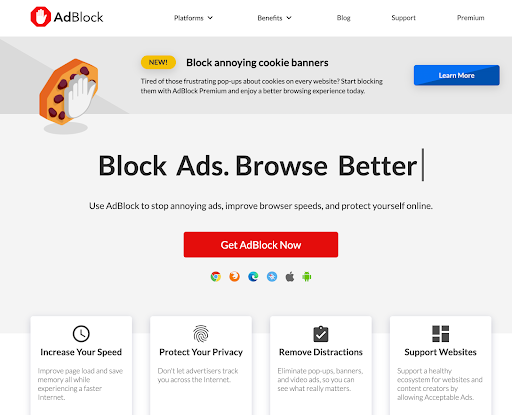
AdBlock does great, especially on YouTube. It blocks banners, pop-ups, auto-play videos, sidebars, and even most YouTube Shorts ads out of the box. It uses EasyList and EasyPrivacy by default, with Fanboy’s Annoyances or malware filters available in the settings. You also get a visual element blocker to hide anything that slips through manually. It’s consistent across most sites, and once you turn off Acceptable Ads, it does a great job of keeping pages clean.
Adblock Plus
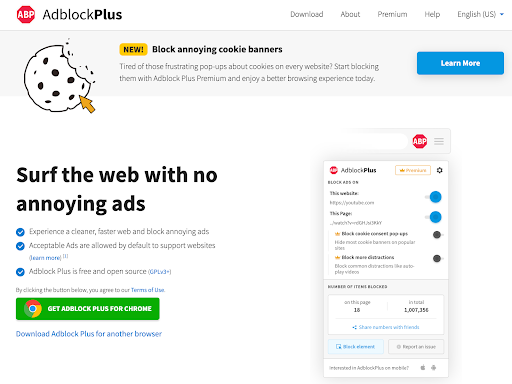
Adblock Plus works well on standard ads but is slightly less effective on video-heavy sites. It uses EasyList by default and supports custom filters, but in practice, you may see some YouTube ads or embedded sponsor content sneaking through unless you tweak things. Like AdBlock, it allows manual blocking and filter list management, but out of the box, it’s not as sharp.
Privacy and Security
When it comes to privacy, both AdBlock and Adblock Plus are… meh. Neither goes above and beyond to protect you, and both have baggage tied to their parent company, eyeo.
AdBlock
AdBlock has toggles for blocking trackers, crypto mining scripts, and some malware domains. It supports EasyPrivacy and other third-party lists, which help keep analytics scripts and basic trackers at bay. But beyond that, there’s not much. There is no fingerprinting protection, DNS-level filtering, or anti-cloaking tools. It also failed some of the more advanced privacy tests like Cover Your Tracks, showing weaknesses against modern tracking techniques. Still, blocking surface-level scripts is fine as long as you customise your filters.
Adblock Plus
Adblock Plus has similar features. It supports tracker-blocking lists and lets you disable Acceptable Ads, but it doesn’t go any deeper than basic filter-based protection. Like AdBlock, it’s vulnerable to fingerprinting and advanced trackers unless you add third-party tools or filters manually. The fact that both extensions allow some ads through by default (yes, even ones with tracking scripts) doesn’t help their privacy credibility.
Neither is built with privacy as a priority. But if you put in the effort to customise filter lists, AdBlock edges out Adblock Plus in both flexibility and tracker protection, though neither is as good as uBlock Origin or AdGuard.
Anti-Adblock Handling & Bypass
As more websites crack down on ad blockers, how well your tool dodges anti-adblock detection makes a big difference. This is where both AdBlock and Adblock Plus start to show their limitations.
AdBlock
AdBlock does a decent job, but only if you put in the work. By default, it doesn’t come with any built-in tools to bypass anti-adblock walls. You’ll need to manually enable extra filters like Fanboy’s Anti-Adblock or add site-specific rules to get past pop-ups that block content when a blocker is detected. On some sites, it works well. On others, you’ll either have to disable the blocker or dig deeper into community fixes.
Adblock Plus
Adblock Plus struggles even more here. It also lacks dedicated anti-adblock countermeasures and fails to bypass many of the more aggressive site-level protections. Even with extra filters enabled, it tends to get caught more often, especially on news and streaming sites. And because it doesn’t support dynamic filtering or custom scripts, you’re left with very limited options when it fails.
AdBlock handles anti-adblock detection better, but it still requires some manual setup. Adblock Plus often gets flagged and doesn’t offer much you can do about it. Neither is a bypass specialist, but if you need to push through walls, AdBlock gives you a little more leverage.
Performance and Resource Usage
Both AdBlock and Adblock Plus are browser extensions, so neither will eat your CPU. But when you look closer, there are some slight differences in how they handle modern web clutter, especially on ad-heavy sites.
AdBlock
AdBlock is mostly smooth but can get a bit slow on pages with dynamic ads or lots of embedded video. If you load up multiple filter lists or use the element blocker a lot, it may use more memory than expected. It’s not unusable by any means, but it’s not the leanest option out there.
Adblock Plus
Adblock Plus is slightly lighter on resources, but that’s because it does a bit less out of the box. It’s not as aggressive with blocking, which means fewer resources are used to process those filters. It’s stable, fast, and doesn’t choke even on older hardware, but it lets more through, which might defeat the point for some users.
Adblock Plus is slightly lighter on system resources, while AdBlock gives you more blocking for a small performance hit. Neither is a resource hog, but if you’re on a slower machine, you might feel the difference.
Usability & Customisability
Installation and Setup
Getting started with either AdBlock or Adblock Plus is easy. Both are designed for people who want instant results with zero friction, and they deliver on that.
AdBlock
AdBlock installs in seconds. Go to the Chrome Web Store (or Firefox, Edge, etc.), click “Add to browser,” and it’s live. There is no account or onboarding wizard. It just starts blocking ads right away. The extension shows a basic dashboard with stats, toggles, and links to settings. It’s a bit cluttered once you start digging into filter options.
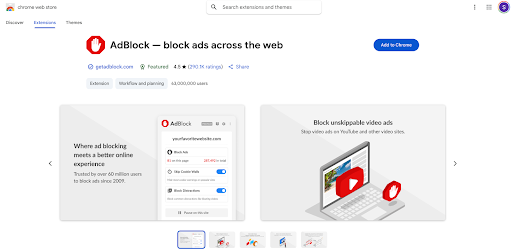
AdBlock was one of the first widely available ad blockers for Chrome, but since then, there have been many more. Even now, after Chrome’s controversial updates that are limiting ad blocker use on the platform, there are many very functional ad blockers. You can read more about them on the best ad blockers for Chrome.
Adblock Plus
Adblock Plus is just as smooth. It installs with one click and is working. The UI is a bit cleaner than AdBlock’s and focuses more on simplicity than showing you all the settings up front. If you want to customize filters or disable Acceptable Ads, it’s all there. Just a few clicks deeper.
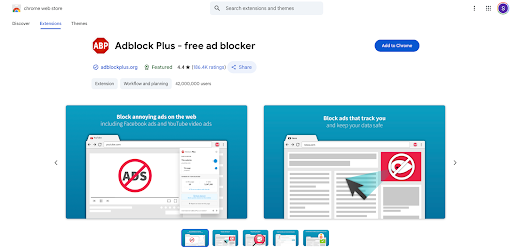
Both are easy to install and ready to go instantly. If you want more visual guidance, Adblock Plus has a cleaner setup flow. If you wish to control and feature access immediately, AdBlock gives you more upfront. Either way, no headaches.
Ease of Use
Both AdBlock and Adblock Plus are designed for casual users, and it shows. You don’t need to be tech-savvy to install either one, and they’re both pretty intuitive once they’re up and running.
AdBlock
AdBlock puts more tools front and center. When you click the extension icon, you’ll see blocked ad counts, a site-specific toggle, and access to element blocking, filter settings, and whitelisting – all in one place. If you’re someone who likes having quick access to options, it’s convenient. That said, the interface can feel a bit cluttered, especially once you start exploring all the filter lists and settings. It’s functional, but not the cleanest.
Adblock Plus
Adblock Plus, by comparison, keeps things simple. The extension pop-up shows fewer options by default: blocked ad count, a big on/off switch, and a link to settings. It’s intentionally stripped down, which makes it easier for first-time users but slightly limiting if you want to customise anything quickly. You can still access filter lists and whitelisting, it’s just tucked away behind more clicks.
Adblock Plus wins on simplicity and visual clarity, making it better for true set-it-and-forget-it users. AdBlock gives you more control on the surface, but it might feel busier if you just want to keep things clean and minimal.
Customisation
If you like to fine-tune how your ad blocker works, both AdBlock and Adblock Plus offer some control, but there’s a big difference in how much.
AdBlock
AdBlock gives you some flexibility. You can switch between multiple filter lists (EasyList, Fanboy’s Annoyances, EasyPrivacy), and there’s a visual element blocker, custom rules, and a whitelist. You also have more immediate access to these options in the pop-up, so everyday adjustments are quicker.
Adblock Plus
Adblock Plus offers similar customisation but keeps everything a bit more hidden. You can enable/disable filter lists, write your own filters, and whitelist sites. However, the interface is more straightforward, so those features feel less discoverable. There’s also less visual feedback when creating rules or blocking elements manually compared to AdBlock.
AdBlock gives you more control and surfaces those options more. Adblock Plus supports most of the same features, but doesn’t make them as accessible. Both are fine for casual users, but for users who like to tweak, AdBlock is the better choice.
Pricing and Plans
Both AdBlock and Adblock Plus are free to use, and for most people, the free versions are enough. But they also offer Premium plans, and that’s where the difference starts to show.
AdBlock
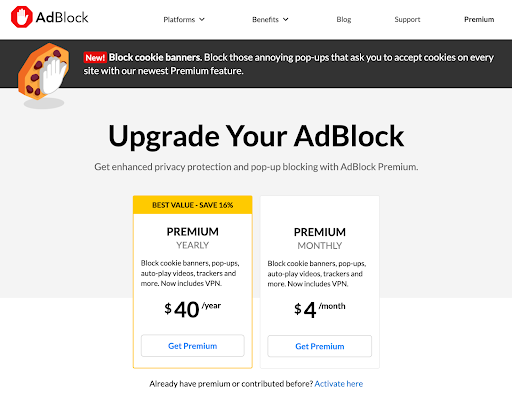
AdBlock is fully functional for free. The free version includes all core features, including YouTube ad blocking, custom filters, element blocking, and tracker protection. The Premium tier costs around $4/ month or $40/year and gives you cosmetic extras like themed popups, settings sync across devices, and fun replacements for blocked ads (like cat pictures). It’s more of a “support the developers” tier than an actual feature upgrade. Nothing essential is locked away.
Adblock Plus
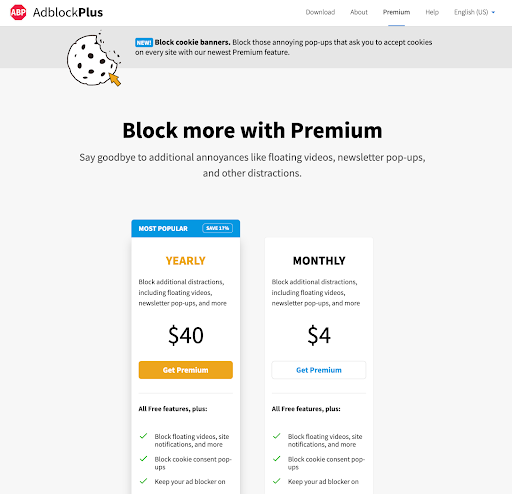
Adblock Plus works the same way. The free version blocks ads, supports filter lists, and allows basic customisation. Their Premium plan costs around $4/month and gives you a basic cookie warning blocker and faster support, but again, nothing game-changing. It’s less about unlocking features and more about removing minor annoyances and supporting the project.
Both are free where it counts, and the Premium plans are optional fluff. AdBlock’s Premium perks feel a little more playful. Adblock Plus focuses on small convenience boosts. Either way, you’re not missing much by sticking to the free version.
Customer Support
Neither AdBlock nor Adblock Plus is known for premium-level support, but they both offer enough to help most users get unstuck, especially considering they’re free tools.
AdBlock
AdBlock offers a decent support experience for a free extension. There’s a searchable knowledge base, setup guides, and a contact form if you need to reach out. Paid users (on the Premium plan) get slightly faster responses, but even free users can expect replies, just not instantly. Most issues can be solved through their documentation or community pages.
Adblock Plus
Adblock Plus has a similar setup. You get access to a help centre with FAQs, a contact form, and responsive email support (especially for Premium users). In fact, Adblock Plus tends to be a bit quicker in replying to support tickets, and their documentation is clear and easy to follow. It’s not live chat, but for a free product, it’s solid.
Adblock Plus has a slight edge in responsiveness, but AdBlock is just as reliable if you’re patient. Neither offers hands-on technical support, but both are more helpful than you’d expect from free browser extensions.
Final Verdict
At a glance, AdBlock and Adblock Plus look almost identical, and honestly, they are in many ways. They’re both built on the same filter list engines, owned by the same company, and come with the same Acceptable Ads nonsense you’ll want to turn off right away.
But when it comes to actual use, AdBlock wins. It blocks more video ads by default (especially on YouTube), gives you quicker access to the filter controls, and feels more responsive to real-world ad formats. It also gives casual users more control without overwhelming them, which matters if you want to tweak your experience just a little without diving into the advanced settings.
Adblock Plus is still functional but feels more reserved. It does the basics well, but often needs extra configuration to achieve the same level of performance. And for a tool that’s been around longer, it feels a bit more limited than its sibling.
So, if you want something that just works and gives you a bit of room to tweak AdBlock is the way to go. Adblock Plus still holds up, but it’s no longer the best of the two, even within its own family.