
We’ve already tested some solid ad blockers here. You can find the best ones in the Best Ad Blockers of 2026. Dedicated tools like these give you numerous features and fine-grained control that power users appreciate. While there’s no serious tradeoff with these, they do require setup, sometimes have a price tag, and can be heavy enough to slow down your system.
A simpler option is to go with a browser that comes with ad blocking built in. These can often be lighter on resources, run faster, and you can just forget that they’re there. Since these browsers are designed with privacy in mind, they also handle fingerprinting better than extensions alone.
But built-in blockers aren’t always as granular as uBlock Origin or AdGuard. You won’t get every tweak and toggle, but what you do get is a streamlined, privacy-focused experience that works out of the box.
A Quick Comparison
These are the five browsers we’ve picked. And before we get into more details, here’s a quick overview:
| Browser | Score | Blocks | Customisation Level | Notable Extras |
| Brave | 96 | Ads, trackers, fingerprinting | High | VPN add-on |
| Avast Secure | 100 | Ads, trackers, phishing, malware | Medium | Bank Mode |
| Opera | 89 | Ads, trackers | Medium | Sidebar apps |
| DuckDuckGo | 61 | Ads, trackers | None | Private search |
| Vivaldi | 43 | Ads, trackers | High | Full UI customisation |
Brave Browser – Perfect Option for Most People
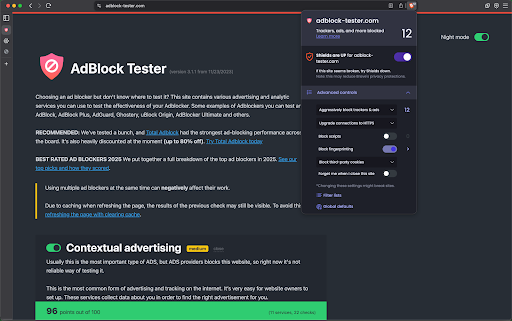
Brave has Shields turned on from the start. Ads, trackers, and fingerprinting scripts are blocked automatically. In our tests, Brave scored 96/100 on AdBlock Tester, one of the best results of any browser.
Brave Shield
Instead of just hiding empty boxes, Brave Shield uses the same filter lists as uBlock Origin and adds its own fixes to prevent site breakage. You can choose Standard mode for safety or switch to Aggressive mode to strip everything.
Loads stuff faster
Fewer ads and trackers mean pages load fast. Brave claims to be up to 6x faster than Chrome. In daily use, it feels quicker and more efficient, with less data and battery strain.
Quite customizable, for a built-in ad blocker
A lion icon in the address bar shows what’s being blocked. From there, you can toggle protections on a site-by-site basis. Power users can also add custom filter lists, but most will be fine with the defaults.
Privacy focused
Brave has fingerprinting protection built in. This makes it harder for sites to identify you, something most extension blockers don’t cover. And because the blocker runs at the engine level, it works just as well on mobile as on desktop. Even YouTube ads disappear on Android.
Crypto stuff
One of the most divisive parts of Brave is the crypto. The browser comes with a built-in wallet and pushes its own Basic Attention Token (BAT) through the Brave Rewards program. The crypto stuff might be nice for some people, but it can also seem like bloat for people who don’t care.
Built-in VPN
Brave also has its own VPN built in. It’s a paid add-on. So you’ll need a subscription to use it, and it only works inside Brave itself, not system-wide.
Optional ads
Brave has a “Brave Rewards” program, which displays ads and pays users in crypto. But it’s opt-in, so you won’t see ads by default.
Avast Secure Browser – Strongest Ad Blocking
Avast Secure Browser is built by the same company behind Avast Antivirus. It’s Chromium-based, but designed to prioritize privacy and security. In our tests, it scored a perfect 100/100 on AdBlock Tester.
Privacy Guard
The built-in ad blocker, called Privacy Guard, is enabled by default. It uses EasyList and other filters to block ads and trackers before they load. You can choose from three modes: Basic, Balanced (default), and Strict. Strict is the most aggressive but may break some sites.
Customization, or lack thereof
A shield icon in the address bar shows what’s being blocked. You can quickly switch between modes or turn blocking off for a single site. Unlike Brave or Vivaldi, you can’t import custom filter lists. Avast keeps it simple.
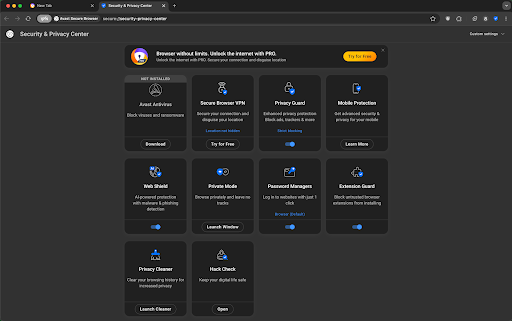
Security & Privacy Center
This is the hub of the browser. From one dashboard, you can manage Adblock, Anti-Fingerprinting, Anti-Phishing, Extension Guard, Privacy Cleaner, Hack Check, and more. It feels more like a security suite than just a browser — something power users might like.
There’s a paid Pro version
Avast also offers a Secure Browser Pro upgrade. The paid tier offers enhanced privacy features, including a system-wide VPN, automatic tracker blocking on all sites, and advanced anti-fingerprinting protection. If you’re already in the Avast ecosystem, Pro ties in nicely with their antivirus and VPN services.
Privacy-focused and has a Bank mode
Beyond ads, Avast adds layers: anti-phishing protection, malware blocking, and Bank Mode. Bank Mode is a secure, isolated desktop session for conducting online banking transactions. These are features you won’t find in most other browsers on this list.
Opera Browser – Got Something For Everyone
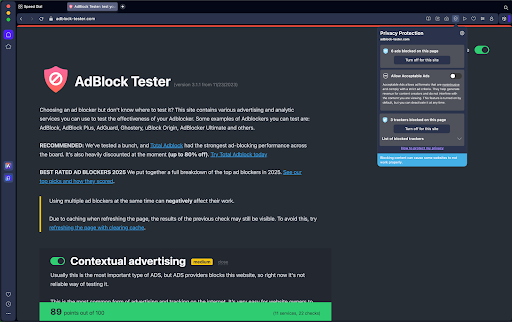
Opera was one of the first mainstream browsers to have a built-in ad blocker. It’s not on by default. But once you get the shields up, Opera scores 89/100 on AdBlock Tester
A surprisingly decent blocker
Opera uses EasyList and NoCoin by default, with optional extras like EasyPrivacy and regional lists. It blocks banners, pop-ups, and most YouTube ads once you enable it. By default, Opera whitelists search engines like Google and Bing, so you’ll still see sponsored results unless you remove those exceptions.
Pretty smooth
With the blocker on, pages load much faster. Opera claims up to 90% faster on ad-heavy sites. The browser itself is light, and the built-in blocker uses fewer resources than an extension.
Quick controls
Tap the blue shield icon in the address bar to view the number of ads blocked or to disable blocking on a site that requires it. In settings, you can manage exceptions and toggle which lists you want on.
Acceptable Ads
Opera’s ad-blocking system is the same as AdBlock and Adblock Plus, both eyeo’s ad blockers. And it also comes with a similar acceptable ads program, which is also enabled by default. You should definitely disable that.
Extra flavours
Opera has multiple spinoffs: Opera GX for gamers (with CPU and RAM controls, plus ad blocking) and Opera Air, a newer AI-focused variant. Both inherit the same ad-blocking core.
DuckDuckGo Browser – Simple, Private, but Not Perfect
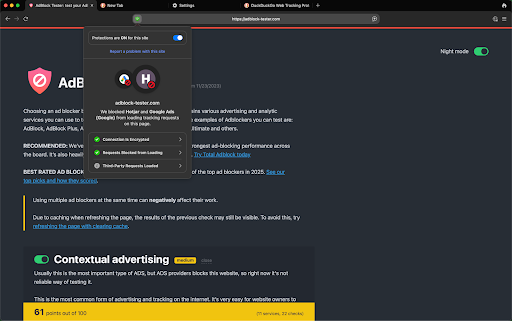
DuckDuckGo made its name as a private search engine, and its browser carries the same philosophy. Ad and tracker blocking is always on. You don’t have to do a thing. In our tests, it scored 61 out of 100 on AdBlock Tester.
Tracker radar in action
The browser blocks hidden third-party trackers by default using DuckDuckGo’s own Tracker Radar list. That kills a lot of ads that rely on tracking scripts like Google and Facebook. It also strips tracking parameters from links and forces HTTPS when possible.
Clean, but not perfect
Because it focuses on trackers, DuckDuckGo doesn’t always catch every ad. First-party ads and some video ads can still get through. YouTube is the classic example. For everyday browsing, though, it does a good job of cutting down clutter and stopping creepy retargeting ads.
Fire and forget
There’s almost nothing to configure. A shield icon indicates what was blocked on each site, and you can disable protections if an issue arises. Otherwise, it just works in the background. For casual users, that’s the whole point.
Lightweight by Design
DuckDuckGo Browser feels lighter than most because it doesn’t ship with its own engine. It simply uses the system’s default WebView. On Windows, it’s Edge WebView2 (basically Chromium with extra steps. And on macOS, it uses a WebKit-based layer. This design makes it fast to launch, easy on memory, and smooth even on modest hardware.
Extra privacy perks
DuckDuckGo browser automatically handles cookie pop-ups when it can, blocks Google AMP pages, and hides social login prompts that track you. On Android, there’s an extra App Tracking Protection feature that blocks trackers inside other apps.
No extensions, no extras
You can’t add custom filter lists or bolt on ad blockers here. What you see is what you get. Power users might find it too limited, but beginners in the privacy space might find it appealing.
Vivaldi – For The Power Users
Vivaldi comes with features you won’t find anywhere else. Tab tiling, split screens, built-in mail, and even a calendar. Ad and tracker blocking is part of the package, but in our tests, it only scored 43/100 on AdBlock Tester, so its strength lies more in flexibility than raw blocking power.
Choose your level
When you first set up Vivaldi, it asks how strict you want to be: no blocking, block trackers only, or block trackers and ads. By default, it recommends tracker blocking, but you can always adjust it if you prefer fewer ads.
Filter list buffet
Vivaldi uses EasyList for ads and DuckDuckGo’s Tracker Radar for trackers. You can also enable EasyPrivacy, regional lists, or import your own custom lists. That last part is key. Few browsers let you add custom lists like Vivaldi does.
Per-site control
Click the little shield icon, and you can adjust blocking for a single site on the fly. Maybe you want to support a favourite blog with ads, but still block everything on social media — Vivaldi makes that simple.
Flexibility over Power
Ad blocking here isn’t as aggressive as Brave or Avast. Some ads, especially on YouTube and other video sites, can slip through unless you adjust your settings or import more robust lists. Still, the built-in controls give you more flexibility than most.
Are built-in ad blockers better than extensions?
Not really. Built-in blockers are good if you want convenience, but they don’t have the raw power of extensions.
Tools like Total Adblock or AdGuard let you dig deeper. You can fine-tune what gets blocked, import dozens of different filter lists, and even clean up annoying page elements that aren’t technically ads.
Built-in systems are solid but more streamlined. Brave works as well as it does because it uses the same filters that uBlock Origin uses. Opera uses a rebranded version of Adblock Plus, right down to its “acceptable ads” program, which means some ads are allowed by default unless you disable that setting. Avast, DuckDuckGo, and Vivaldi do a decent job out of the box, but they’re nowhere near as customisable as a full extension.
Do built-in ad blockers block YouTube ads?
YouTube is one of the hardest to block because it serves ads from the same domain as the video. Most built-in blockers can’t keep up.
Brave is the exception. Its Shields system uses the same filter rules as uBlock Origin and strips out YouTube pre-rolls, mid-rolls, and banners. On Android and iOS, Brave is an easy way to block YouTube ads.
DuckDuckGo takes a different approach with Duck Player. Instead of loading YouTube normally, it loads videos in a stripped-down player with no personalized ads or tracking. It’s clever, but it’s not the default experience. You have to opt to use Duck Player, and sometimes it misses features like comments or playlists.
The rest are a hit or miss. Opera blocks ads on many sites, but struggles with YouTube, and its whitelisting of Google services makes it even less reliable in this regard. Avast Secure Browser can filter some ads in strict mode, but it often breaks. Same goes for Vivaldi.
Wrapping Up
Built-in ad blockers make life easier. They’re lighter, faster, and don’t require all the tweaking that comes with extensions. But they’re not all equal. Brave and Avast Secure Browser are at the top of the list for blocking power, Opera and Vivaldi add flexibility and extra features. DuckDuckGo is the simplest option, especially on mobile, but not perfect.
If you want total control, dedicated tools like Total Adblock or AdGuard are still the heavyweights. However, for most people, choosing a browser with ad blocking built in is enough to get a cleaner, faster, and more private web experience.
Want to see how your browser scores? Run it through AdBlock Tester and check the results yourself.