
Linux is prioritized by privacy-focused users because of its lack of telemetry. But just because the OS is privacy-oriented doesn’t mean you don’t have to do anything. Every app you install, every website you visit, can still track you in different ways. And you’ll get the same amount of ads as you get on any other OS. So you still need an ad blocker. A really good one at that.
But there’s an issue here. Linux doesn’t have a large selection of good ad blockers. And even the ones it has often lack a Graphical User Interface (GUI). This can make them difficult to use for newcomers who aren’t very comfortable using the command line interface (CLI).
But just a lack of a GUI shouldn’t stop you from getting the best option. Yes, AdGuard is available on Linux. We’re going to give you a few more options as well as help you set up AdGuard using CLI. Because it’s not that hard, it just looks a little bit intimidating.
What’s the Easiest Way to Block Ads on Linux?
Want a system-wide solution without juggling multiple tools? AdGuard for Linux is the easiest and most effective way. It filters ads, trackers, and malicious domains across your entire system, not just inside your browser. And while it doesn’t have a GUI on Linux, the setup is way simpler than it looks. You install it with one command, run a quick config wizard, and AdGuard does the rest in the background. Compared to managing host files, tweaking DNS settings, or maintaining a Pi-hole install, AdGuard gives you a simple “install once and forget” experience that works on any distro, especially Ubuntu.
How to set up AdGuard on Linux? (Step-by-step)
1. Download and install AdGuard
To install AdGuard, you need to simply run an installation script.
- Open the Terminal app of your choice
- Run the following command: curl -fsSL https://raw.githubusercontent.com/AdguardTeam/AdGuardCLI/release/install.sh | sh -s — -v
- Wait for it to finish installing
This pulls the latest AdGuard build and installs it automatically.
2. Activate your trial or license
AdGuard on Linux requires a premium licence. It is very inexpensive compared to most other ad blockers. And you can get a lifetime licence with a one-time payment. Learn more about that here. Once you’ve gotten your license, you have to activate it. Here’s how to do it.
- Open Terminal
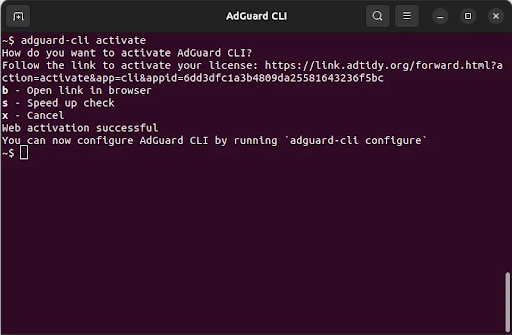
- Type in: adguard-cli activate
- You can use the free trial or enter an existing license.
- Once you’re done, you will get a “web activation successful” message
3. Run the configuration wizard
Once the activation is successful, it’s time to configure it. AdGuard is one of the most customizable ad blockers, and you should take full advantage of it.
- To set up your filters and preferences:
Run: adguard-cli configure in Terminal - Choose recommended filters unless you need something specific.
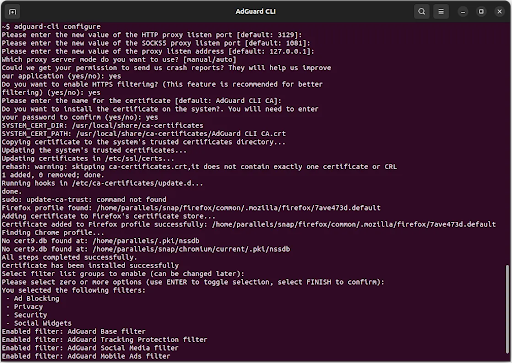
It’s a very guided configuration process, so you should be able to navigate through it easily.
4. Start blocking ads
- Once activated and configured, you need to enable AdGuard.
- To turn on AdGuard’s system-wide filtering, run: adguard-cli start in Terminal
- You’ll get a message “AdGuard Proxy server has started successfully.”
5. Check status
If you ever need to verify that everything is running properly, run: adguard-cli status
6. Optional: fine-tune settings
AdGuard supports extra modules like DNS filtering, custom lists, exclusions, and safe browsing.
All of which can be reconfigured anytime through adguard-cli configure. But if you ever need a quick list of all available commands, type in adguard-cli –help-all into the terminal, and you’ll have the full list.
Once these steps are done, AdGuard runs quietly in the background, blocking ads and trackers across all apps and browsers on your Linux system.
Best Ad Blockers for Linux in 2025
Linux isn’t exactly rolling out the red carpet when it comes to ad-blocking apps. You’re on your own when it comes to deciding which tools to use. And to be honest, the ‘best’ ones will depend on how much you’re willing to get your hands dirty with browsers, DNS filtering, or the terminal. But don’t worry, we’ve still got a shortlist for you.
AdGuard for Linux (The Ultimate System-Wide Blocker)
If what you’re after is one tool that gets rid of ads across your entire system, then AdGuard for Linux should be your go-to. It filters out the bad stuff, whether it’s ads, trackers, or malicious domains at the OS level. Which means every single browser and app on your machine is going to be ad-free; no manual fiddling required. There isn’t a GUI, but trust me, the CLI setup is as straightforward as it gets.
uBlock Origin (Best For Your Browser)
uBlock is still the gold standard when it comes to browser filtering. uBlock Origin is lightweight, super efficient, and totally open source. If website ads are driving you crazy, then this one’s going to be your best friend. It’ll sort the problem out in an instant. Just keep in mind, it only protects your browser. It won’t touch anything else on your system.
AdGuard Home
A great middle ground for people who want a GUI but don’t want to be a network expert, and who are willing to host their own blocker. AdGuard Home filters ads at the DNS level, so every device on your network gets to enjoy the benefits. It’s more beginner-friendly than Pi-hole, comes with built-in support for encrypted DNS, and has parental filters on tap.
Pi-hole
Pi-hole’s been around for ages, and it’s a classic for a reason. It’s reliable, open source, and perfect if you’ve already got a spare Raspberry Pi or home server lying around. Just be aware that DNS-level blocking has its limits, especially on platforms like YouTube, so you might still want to have a browser blocker on top as a backup.
Brave Browser
If you don’t even want to install anything, Brave is your best friend. Its native ad blocker works pretty well on Linux. Not a system-wide solution, but perfect for users who want strong protection without any hassle.
hBlock / hosts-file blockers
These are super-lightweight scripts that pull in massive blocklists and rewrite your hosts file. They’re fast, distro-agnostic, and require little setup. Suitable for minimalists or people running older hardware.
GNOME Web with Libadblocker
If you’re on a GNOME-based distro, you’re in luck. GNOME Web (Epiphany) comes with libadblocker built right in. It’s not as powerful as uBlock Origin, but it’s clean, simple, and integrated into the Linux ecosystem.
Which Linux ad-blocker to choose?
Browser extensions
Want results now with zero setup? A browser extension like uBlock Origin is the way to go. It cleans up most websites instantly and gives you granular control over what loads. The catch is obvious, though: it only protects your browser. Any app outside that sandbox can still send data to trackers.
DNS-based blockers
Tools like AdGuard Home or Pi-hole filter at the DNS level, so every device connected to your network benefits. Perfect if you like to tinker or already have a home server lying around. Just remember, DNS filtering isn’t foolproof. Ads served from the same domain as the content, especially platform-based video ads, often bypass DNS filters entirely.
System-wide blockers
Want full protection across every browser and app on your Linux machine? A system-wide blocker is the most reliable long-term solution. That’s where AdGuard for Linux shines. It filters traffic directly on the device, quietly removing ads, trackers, and malicious domains without you having to manage multiple tools.
So what to choose?
Beginners will be happiest with a browser extension. Tinkerers and network enthusiasts will enjoy Pi-hole or AdGuard Home. But if you want a consistent, OS-level clean experience that works across everything you do, a system-wide blocker gives you the smoothest result, and AdGuard is the most practical option for Linux today.
How to block YouTube ads on Linux
YouTube is the one platform that slips through almost every traditional ad-blocking method, especially DNS-based blockers like Pi-hole or AdGuard Home. That’s because YouTube serves ads and actual video content from the same domains, making DNS filtering almost useless. So if you want smooth, reliable YouTube ad blocking on Linux, you need a combination that targets both network traffic and in-browser elements.
The most effective setup is surprisingly simple: AdGuard for Linux + Firefox with uBlock Origin.
AdGuard for Linux handles everything outside the browser
AdGuard filters traffic at the OS level, so any YouTube ads coming from app wrappers, video downloaders, or external embeds get intercepted before they load. It also blocks YouTube’s tracking endpoints, fingerprinting scripts, and malicious redirects. This gives you a strong baseline filter that runs in the background, no matter which browser or app you use.
Firefox + uBlock Origin handles the cosmetic and script-based ads
YouTube ads inside the browser need a dedicated extension because they rely heavily on dynamic scripts and client-side tricks. uBlock Origin’s advanced filter lists hide the player ads, skip pre-rolls, and block sidebar sponsored cards that a system-wide blocker can’t touch.
Firefox is the better choice here, since Manifest V3 increasingly restricts Chrome-based browsers. uBlock Origin on Firefox still has access to stronger filtering rules, which makes YouTube blocking far more consistent.
The final setup that actually works
- Install AdGuard for Linux to block system-wide YouTube tracking and secondary ad endpoints.
- Use Firefox as your primary browser.
- Install uBlock Origin and keep the YouTube-specific filter lists enabled.
This combination covers everything:
- pre-roll ads
- mid-roll ads
- sidebar ads
- homepage sponsored content
- tracking requests
- embedded video ads in other apps
No DNS blocker can fully stop YouTube ads alone, but pairing AdGuard’s system-wide filtering with uBlock Origin inside Firefox gives you the most reliable, smooth, and frustration-free YouTube experience on Linux today.
Wrapping Up
Linux gives you a lot more control over your system than most other operating systems, but the truth is, ad blocking isn’t something it can just sort out for you. The good news is, once you get your head around the different ways it can be done: browser extensions, DNS blocking, and system-wide protection, choosing the right approach really isn’t that complicated.
If you just want sites to load up with a lot less clutter about them, uBlock Origin does a great job right out of the box. If, on the other hand, you want to keep all your home devices ad-free, Pi-hole or AdGuard Home offer a nice safety net for your whole network. But if you want a single, all-in-one solution that just works really well on one Linux machine, then AdGuard for Linux does its thing quietly in the background.
Pair it up with Firefox and uBlock Origin, and even super stubborn websites like YouTube are no longer a problem. After that, you don’t have to think about ads again, and your Linux desktop will stay clean, fast, and focused, which is what you want from a desktop.