
Your online safety is as strong as your weakest password. Now that most of our essentials (including our bank accounts) are on the internet, using a combination of your birthday, an old phone number, and your pet’s name doesn’t cut it anymore.

We know you know better. But between the work apps, streaming, socials, banking, and the five new accounts that you created last week, it can get very chaotic to manage separate passwords for each of those accounts. Dashlane promises to manage that chaos for you with its industry-grade security, quick and fluid autofill, and a lot of extras.
Quick Overview
| Category | Details |
| Encryption | AES-256 with Argon2 key derivation |
| Open Source | Partially. Client-side apps are open-sourced,but core server code is closed |
| 2FA Support | Authenticator apps (TOTP), email codes, biometric unlock;hardware keys supported as passwordless login |
| Cross-Platform | Windows, macOS, Linux (via web app/extension),iOS, Android, plus browser extensions |
| Recovery Options | Account Recovery Key (28-character code), biometric recovery,admin recovery for business accounts |
| Offline Access | Yes, full access on any device where you’ve logged in before;read-only for passwordless accounts without internet |
| Free Plan | Discontinued |
| Price | Starts at $45/year |
Their pitch is plain and simple. You get strong encryption, passkeys support, 2FA, a dashboard that monitors data breaches for any of your credentials, and even a VPN. Let’s see if it lives up to its promise.
Pros and Cons
Pros
- Strong encryption and zero-knowledge design
- SOC 2 Type II & ISO 27001 certified
- No known breaches in over a decade of operation
- Dark web monitoring and alerts for up to 5 emails
- Built-in Hotspot Shield VPN included with Premium and Family plans
- 1GB encrypted file storage for sensitive documents
- Generous Family plan with up to 10 users
- Companion apps for watchOS and Wear OS for quick OTP and login access
Cons
- The free plan is being discontinued after September 2025
- More expensive than the competition
- No full native desktop app for Windows or Linux (web/extension only)
- Emergency access is limited, and there is no built-in “trusted contact” feature
Is Dashlane Safe?
Dashlane is one of the most secure password managers in 2026. Your data is encrypted using AES-256, with Argon2 as the key derivation function. Banks and governments trust the industry-leading AES-256 cipher, and Argon2 makes brute-force attacks slow, memory-intensive, and impractical.
Dashlane runs on a zero-knowledge architecture, which means your Master Password never leaves your device. All the encryption and decryption happen locally, so even if Dashlane’s servers were compromised, the attackers would only see gibberish. The company can’t read your vault, and neither can anyone else without your key.
Unlike LastPass, Dashlane has never had a breach of customer vaults. The service has been around since 2012 without leaking encrypted vault data, and now backs its security claims with third-party audits. In 2024, Dashlane got SOC 2 Type II and ISO 27001 certifications, which require independent verification of its infrastructure and security practices.
There are also layers of protection on your side. You can enable 2FA via authenticator apps or biometrics, set up a Recovery Key in case you forget your Master Password, and register a FIDO2 hardware key to go passwordless.
Of course, the usual disclaimers apply here, too. If you choose a weak Master Password or don’t bother with 2FA, you’re creating your own vulnerabilities. But if you follow Dashlane’s recommendations, your vault is as close to unbreakable as a consumer service can get.
Which Devices and Platforms Does Dashlane Work On?
Dashlane covers almost every device you’d expect in 2026, but the way it works is slightly different from the old days of standalone desktop apps. The service has transitioned to a web-first approach, with the browser extension and mobile apps now at the core of the experience.
Desktop and Web
- On Windows and Linux, you use Dashlane through the web app and browser extensions for Chromium and Firefox-based browsers. There’s no longer a traditional desktop client, but the extension handles autofill, password capture, and quick vault access.
- On macOS, you get both the browser extension and a native Mac app, which integrates with Safari and lets you unlock with Touch ID.
Mobile
- Dashlane has full-featured apps for both iOS and Android. They integrate with each system’s Autofill API, so your credentials pop up in apps and browsers just like a built-in manager would.
- Unlocking with Face ID, Touch ID, or Android biometrics allows you to type your Master Password on small screens rarely.
- Offline access works once your vault is synced. You can still view and copy logins without an internet connection, with changes syncing later.
Wearables
- On Apple Watch (watchOS), Dashlane has a companion app that lets you quickly view selected logins or one-time codes at a glance. It comes in handy if you need quick access to a 2FA code without reaching for your phone.
- On Wear OS, you can do the same. Access credentials and TOTP codes directly on your smartwatch. It’s not a whole vault experience, but it’s quite convenient for quick logins.
Sync and Access
Everything syncs automatically via the cloud. Save a login on your laptop, and it’s on your phone and watch within seconds. If you’re offline, cached data is still available locally (as long as you’ve logged in before).
What Else Does Dashlane Offer Besides Password Management?
Dashlane offers numerous extras that turn it into an all-in-one security tool, some of which you won’t find in other password managers.
Secure Notes & Payment Info
Dashlane’s vault lets you keep secure notes, IDs, and payment cards under the same AES-256 protection. At checkout, it autofills your saved credit cards and addresses, just like Chrome’s autofill, but with better security.
Password Sharing
Sharing logins is easy. Free users can share with one person, while Premium and Family accounts allow unlimited secure sharing. You can grant full or limited rights, and any updates to shared passwords will sync instantly.
Built-in Authenticator
Dashlane acts as a TOTP authenticator, so it can generate 6-digit codes for your logins that require two-factor authentication. Those codes will sync across your devices and autofill with your password. For your Dashlane account itself, you’ll still want a separate 2FA app for safety.
Emergency Access & Recovery
Dashlane doesn’t have a one-click “trusted contact” feature like some competitors. Still, you can generate an Account Recovery Key or create an encrypted vault backup (a DASH file) for safekeeping. Business accounts have admin-assisted recovery, so no employee is permanently locked out.
Secure File Storage
Premium users get 1GB of encrypted file storage. Attach scans of your passport, backup codes, or sensitive PDFs to entries in your vault. Everything is encrypted locally before syncing, so it’s safer than putting those files in Google Drive.
Dark Web Monitoring
Add up to 5 email addresses, and Dashlane will scan breach databases and the dark web. If your credentials show up, you’ll get an alert with the details and a nudge to change the compromised passwords.
VPN Included
Dashlane Premium comes with Hotspot Shield VPN. It’s not a proper dedicated VPN like Surfshark or NordVPN. So it won’t cut it if you’re a heavy torrenter or location spoofer, but for day-to-day browsing and securing public Wi-Fi, it’s fast and reliable.
Passkey Support
Dashlane was one of the first managers to support passkeys. You can create, save, and autofill them across your devices, and log in with biometrics instead of passwords. Dashlane also supports passwordless login to your vault with Face ID, Touch ID, or a FIDO2 key.
Enterprise Features
For businesses, Dashlane scales with admin consoles, SSO integration, directory sync, SCIM provisioning, and audit logs. Teams can share Collections, enforce 2FA, and monitor password health at scale. Some enterprise plans also include advanced phishing detection and SIEM integrations.
Using Dashlane Day to Day
A password manager has to disappear. If it interrupts you or makes logins harder, you’ll stop using it. Dashlane manages to stay out of the way while layering in security checks that don’t feel annoying.
Setup & Ease of Use
You can get started with Dashlane in just minutes. But it’s a little bit more involved than most.
- Download the app or browser extension, create an account, and set a strong Master Password.
- Dashlane then asks you to enable 2FA, generate a recovery key, and import existing logins from Chrome, LastPass, 1Password, or a CSV file.
- Onboarding includes a quick security check, so you immediately see which passwords are weak or duplicated.
From there, Dashlane autofills logins as you browse, prompts to save new ones, and can even capture payment card details at checkout. The learning curve is minimal, and you can go back.
User Interface & Design
Dashlane has a very clean and modern UI. And it’s consistent across platforms.
The web app and extensions use a sidebar layout: Passwords, Secure Notes, IDs, and Payments each get their own space. The mobile apps use a bottom navigation bar, with Home, Vault, Sharing, and Tools clearly separated. Dark mode is available, and the UI is simple.
You won’t get endless customization options, but it’s polished enough that non-technical users won’t feel overwhelmed. Even the watchOS and Wear OS companions are well designed: one-tap access to one-time codes or selected logins without digging for your phone.
Performance & Reliability
Daily performance is good enough that you won’t even see any slowdowns.
Autofill works quickly and accurately on most sites and apps. It handles multi-step logins well, although the occasional unusual form may require manual copy and paste. And syncing is nearly instant. If you add a password to your phone, it’ll be available on your laptop within seconds. Moreover, Offline access is reliable as long as you’ve logged in before; any changes queue up and sync when you reconnect.
And the overall stability of the service is also great. The apps and extensions rarely crash, and updates roll out regularly without breaking features. And it asks for your Master Password sometimes instead of just biometrics for extra security.
How Much Does Dashlane Cost? – Pricing & Plans
Dashlane is a premium service, and the pricing reflects that. It’s not the cheapest, but you’re paying for extras like a bundled VPN, dark web monitoring, and one of the most polished user experiences in the market.
Free Plan
For now, Dashlane Free lets you store up to 25 passwords on a single device. You get autofill, password generation, and 1GB of secure file storage, but no syncing across devices.
Please note that Dashlane is retiring the Free plan after September 2025, so new users will only have a Premium trial and then need to upgrade.
Free Trial & Money-Back Guarantee
Dashlane offers a 30-day free Premium trial for new users and a 30-day money-back guarantee on all paid plans.
Premium ($45/year)
The individual plan is the entry point for most users. For about $3.75/month (billed annually) you get:
- Unlimited passwords on unlimited devices
- Dark web monitoring for up to 5 emails
- Built-in Hotspot Shield VPN
- Secure sharing of unlimited logins and notes
- 1GB of encrypted file storage
- Passkey support and TOTP authenticator
- Priority support
It’s more expensive than Bitwarden or even 1Password, but you’re getting an all-in-one bundle here.
Friends & Family ($89.88/year)
At $7.49/month (billed annually), this plan covers up to 10 users, each with their own Premium account. That’s more than most competitors’ family plans (usually 5 or 6 people). Everyone gets:
- Unlimited passwords and devices
- All Premium features (VPN, dark web monitoring, sharing, etc.)
- A central dashboard to manage invitations and members
- At under $90/year total, it’s a great value if you fill most of the slots.
Business & Enterprise Plans
Business Team Plan (~$8/user/month)
Everything in Premium, plus an admin console, group sharing, policy enforcement, SSO integration, and detailed audit logs.
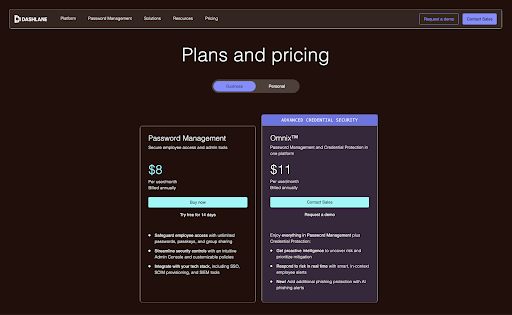
Enterprise (Omnix) (~$11/user/month)
Adds advanced phishing detection, SIEM integrations, and enterprise-level onboarding support.
Both tiers include a bonus: each employee also gets a Dashlane Family subscription for personal use at no extra cost.
Is Dashlane Premium Worth It?
Yes, Dashlane is one of the most secure and premium password managers available right now, and it is totally worth it, but only if you’ll actually use what it offers.
The basics (unlimited passwords, autofill, sync across devices) are table stakes at this point. Dashlane justifies its higher price with the extras. There’s a built-in VPN, continuous dark web monitoring, 1GB of secure file storage, and polished apps that work everywhere from your laptop to your smartwatch.
At $45 a year for Premium, Dashlane is more expensive than Bitwarden ($10/year) and a touch pricier than 1Password (~$36/year). But for that extra cost, you get more than just a password vault. For some users, the VPN alone would cost as much as Dashlane’s subscription, making it a good value when bundled.
The Family plan is even more compelling. At $89.88/year for up to 10 users, it’s one of the best multi-user deals around. That’s under $9 a year per person if you fill all the slots.
However, Dashlane isn’t for the ultra budget-conscious or those who only want the bare minimum. But if you want an all-in-one security suite that covers logins, browsing safety, and breach monitoring in one subscription, then yes, Dashlane Premium (or Family) is worth it in 2026.
Dashlane vs 1Password vs Bitwarden
When stacked against its closest rivals, Dashlane positions itself as the feature-heavy, premium choice.
| Feature | Dashlane | 1Password | Bitwarden |
| Security | AES-256 with Argon2, zero-knowledge | AES-256 with PBKDF2-SHA256 (650k iterations), Secret Key, zero-knowledge | AES-256 with PBKDF2-SHA256, open-source code |
| Ease of Use | Modern web-first apps, smooth autofill | Consistent UI, easy onboarding | Clean and functional UI, a bit technical for some |
| Cross-Platform | Windows, macOS, Linux (via web), iOS, Android, browser extensions, watchOS, Wear OS | Windows, macOS, Linux, iOS, Android, browser extensions; CLI support | Windows, macOS, Linux, iOS, Android, browser extensions; self-hosting option available |
| Starts at | $45/year | $35.88/year | $10/year |
| Free Plan | Not available, however there’s a 30-day trial and another 30 days’ refund window | None. 14-day trial only | Yes. Unlimited passwords and devices, core features included |
| Trust Factor | High. No breaches, transparent audits, partly open-source clients | High. Spotless record, third-party audits | High. Fully open-source, community-trusted, audited |
Comparisons help clarify:
- Bitwarden is unbeatable if you want transparency and the lowest possible cost. But you won’t get a VPN, breach monitoring, or Dashlane’s extra polish.
- 1Password offers a refined experience and unique features like the Secret Key and Travel Mode. If you don’t care about the VPN or dark web scans, it edges out Dashlane on cost.
Wrapping Up
Dashlane in 2025 is a complete security package. It has strong encryption, reliable autofill, and cross-platform support with a few extras like VPN and Dark Web Monitoring.
The trade-off is cost. $45 a year for Premium and $90 for Family is more than Bitwarden and 1Password, especially once the free plan goes away.
If you want the cheapest option, you can go wrong with Bitwarden. If you wish to the slickest apps, go to 1Password. But if you want a security-first manager that bundles in meaningful extras and scales for families or businesses, Dashlane is worth it.