
Keeper Password Manager is a veteran password manager in the market. It was developed by Keeper Security, which was founded in 2011, In 2026, Keeper stands out mainly for its security-first approach.
It’s built on a zero-knowledge architecture and has never suffered a data breach. The platform is trusted by millions of users and thousands of organizations worldwide, including many businesses and even government agencies. Keeper is FedRAMP-authorized for U.S. federal use.
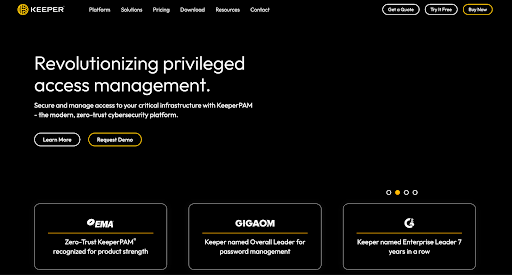
With an extensive feature set and a reputation for top-notch security, Keeper is often mentioned in the same breath as other top managers like 1Password and Bitwarden.
A Quick Overview
| Category | Details |
| Encryption & KDF | End-to-end AES-256 with per-record keys, Master key derived with PBKDF2-HMAC-SHA256 1M |
| Open Source | No |
| 2FA Support | TOTP apps, email/SMS codes, biometric unlock, FIDO2/WebAuthn hardware keys |
| Cross-Platform | Windows, macOS, Linux, iOS & Android apps, Web Vault, browser extensions |
| Recovery Options | Recovery Phrase; Emergency Access |
| Offline Access | Yes |
| Free Plan | Yes, but mobile-only on a single device, no sync |
| Starting Price | $39.99/year |
In this in-depth review, we’ll examine what makes Keeper noteworthy. We’ll cover its encryption and security model, cross-platform support, unique features, day-to-day usability, pricing plans, and how it stacks up against competitors. If you’re wondering whether Keeper is the right choice for managing your passwords in 2025, read on for a comprehensive breakdown.
Pros and Cons
Pros
- Zero-knowledge design with very strong encryption and brute-force resistance.
- No breaches in over a decade of operation.
- One-Time Share links for secure external sharing.
- Emergency Access with up to five trusted contacts.
- Built-in TOTP authenticator for 2FA codes.
- Secure file storage upgradable to 100 GB
- 24/7 customer support.
- Exclusive discounts for students and frontliners.
Cons
- Free plan limited to one mobile device, no sync.
- BreachWatch dark web monitoring is a paid add-on.
- Closed-source code (not publicly auditable).
- Family plan costs more than most password managers.
Is Keeper Password Manager Safe?
Yes, Keeper is an extremely safe password manager by industry standards.
It uses end-to-end AES-256 bit encryption for all data in your vault. All encryption and decryption happens locally on your device (zero-knowledge), so Keeper’s servers never see your master password or plaintext data. Even metadata like folder names and URLs can be encrypted. Each record in your vault is encrypted with its own AES-256 key, which is then wrapped by higher-level keys. It’s basically a multi-layered encryption model. Keeper derives the master vault key using PBKDF2-SHA256 with an extremely high iteration count (1,000,000 rounds) for strong resistance against brute force. This is way more than many other password managers use, reflecting Keeper’s conservative, NIST-aligned approach to cryptography.
Aside from the multi-layered encryption model, Keeper has a great track record with third-party assessments. It has one of the longest-standing SOC 2 Type II certifications in the industry and is also ISO 27001 certified. In fact, it has multiple ISO certifications and is TRUSTe privacy verified. Keeper Security’s environment has been audited by independent experts. Plus, Keeper’s solutions achieved FedRAMP Authorization for government use and FIPS 140-3 validation for its crypto module. That’s some serious endorsements that say a lot about Keeper’s enterprise-grade security.
To secure logins, Keeper supports a ton of two-factor authentication options. You can enable TOTP codes via authenticator apps, get SMS or email one-time codes, use hardware security keys, and even authenticate via biometric methods like Face ID or Touch ID. On the desktop app, you can also set a self-destruct that will wipe the local vault after a number of failed master password. Keeper also logs you out after inactivity and can clear clipboard data after a set time to prevent snooping.
And most importantly, Keeper has no known breaches or security incidents in its history. Keeper’s security record is spotless. The company’s proactive approach, regular updates, bug bounty programs have helped it avoid the mistakes some of its competitors have made.In short, Keeper is very safe. Top-tier encryption, zero-knowledge, and multiple certifications. No breaches and compliant. Use a strong master password and 2FA, but Keeper has a very secure vault for your stuff.
Which Devices and Platforms Does Keeper Work On?
Desktop & Web
Keeper works on all major desktop operating systems with native apps for Windows, macOS and Linux. The apps give you the full vault experience: you can browse, organize and edit your credentials, attach files and even generate new passwords directly on your computer.
For situations where installing an app isn’t possible, there’s also a Web Vault that works in any modern browser. The Web Vault mirrors the desktop app’s functionality and can even run in offline mode once primed with your data.
Mobile
On iOS and Android, the mobile apps give you the same functionality in a smaller, touch-friendly package. They integrate with each platform’s native autofill framework, so saved credentials pop up in apps and browsers just like they would with Apple’s or Google’s built-in password managers.
Biometric unlock is supported on both systems, so you can use Face ID, Touch ID or a fingerprint instead of typing your master password. The apps also add a few extras. You can enable self-destruct mode to wipe the vault after multiple failed login attempts, or turn on fast login mode so credentials are filled and submitted in one step.
Browser Extensions
KeeperFill, the extension available for Chrome, Firefox, Edge, Safari, Opera, Brave and most Chromium-based browsers. Keeper really integrates into your browsing routine. The extension watches for login fields, suggests saved credentials and captures new sign-ups or password changes automatically. KeeperFill also supports TOTP codes stored in your vault, autofilling both your password and the six-digit code for two-factor logins when set up.
Wearables
Keeper adds a new layer with KeeperDNA, its smartwatch integration for Apple Watch and Android Wear. Instead of pulling out your phone for every two-factor prompt, you can get approval requests on your wrist and approve them with a tap. Selected records, like one-time codes or specific credentials, can also be made available on the watch for easy access.
Offline Access & Sync
Some competitors require a live internet connection. Not Keeper. The desktop apps and Web Vault both support offline vault mode where you can view or edit entries without a connection and those changes will sync when you get back online.
On mobile, cached offline mode is automatic and you can control how long offline access is allowed. The only caveat is two-factor authentication is disabled when offline since there’s no server to validate the codes. Otherwise everything, including edits and new entries, will sync across all devices as soon as you get back online.
What Else Does Keeper Offer Besides Password Management?
Keeper is an enterprise-first password manager. But that doesn’t mean it ignores the extras. Over time it has grown into a broader digital vault with a stack of features that cover the rest of your sensitive data and how you share it.
Secure Notes & Personal Info
The vault isn’t limited to logins. You can store free-form secure notes, as well as structured records for payment cards, bank accounts, IDs and addresses. When you check out online Keeper can autofill your stored credit cards and shipping details making it a safer alternative to relying on Chrome or Safari’s built in autofill.
Password Sharing & One-Time Share
Keeper makes collaboration safe with encrypted sharing. Within the app you can share individual logins or entire folders with other Keeper users, controlling whether they can just view, edit or re-share an item. For quick, ad-hoc sharing outside of Keeper there’s One-Time Share. You can generate a secure link that expires after a single use. It’s handy for sending a Wi-Fi password to a guest or passing a credential to a contractor without worrying it will linger forever.
Emergency Access
For personal accounts Keeper includes an emergency access system for digital inheritance. You can nominate up to 5 trusted contacts who will be able to access your vault if something happens to you. Each contact is assigned a delay period (say 2 days or a week) so you’ll have the chance to deny access if the request wasn’t legitimate. If you don’t respond the vault is automatically made available to them.
BreachWatch Dark Web Monitoring
Keeper has its own dark web scanning service called BreachWatch. It checks your saved usernames and passwords against leaked databases and alerts you if any of your credentials are exposed. The catch is BreachWatch isn’t bundled by default it’s an optional paid add-on. For those who want to subscribe it provides early warning if your accounts show up in a data dump so you can change compromised passwords quickly.
Secure File Storage
Beyond text entries Keeper also lets you attach files to your records. Things like passport scans, backup codes or medical records. These attachments are encrypted just like your passwords and sync across your devices. The Family plan includes 10GB of secure storage, individuals can purchase add-ons from 10GB to 100GB depending on need.
Passkey Support
Keeper is also passwordless ready. Passkeys can now be used to unlock the Keeper vault itself on supported platforms, using biometrics like Face ID or Windows Hello instead of typing the master password. Broader passkey storage and syncing for your website accounts is coming, so Keeper will manage both your passwords today and passwordless credentials tomorrow.
Built-in Authenticator
Keeper can be a 2FA app. When you set up TOTP codes for services, you can store the QR secret in Keeper and it will generate 6 digit codes alongside your saved password. The KeeperFill extension and mobile app can then autofill both the password and the time-based code in one go, so you don’t have to juggle a separate authenticator app.
Enterprise & Business Features
As we’ve mentioned before, Keeper is Enterprise-ready. Business and Enterprise plans include an admin console, role-based access controls, policy enforcement and integration with Active Directory, Okta and SSO providers. Detailed event logging and SIEM integrations give IT teams visibility without exposing any vault contents.
Using Keeper Day to Day
Setup & Ease of Use
Getting started with Keeper is as easy as a pie.
After you create an account you set a strong master password and are asked to generate a 24 word recovery phrase. From there the onboarding flow walks you through installing the browser extension, enabling two-factor authentication and importing your existing logins. Imports can be done directly from browsers and other password managers or via CSV if needed.
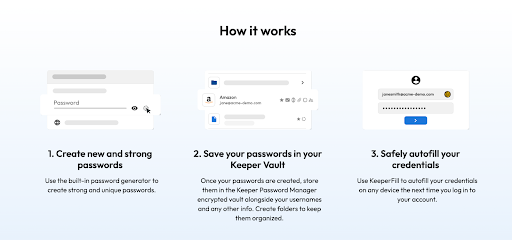
It’s not one-click perfect but it’s clear and easy enough that non-technical users won’t feel overwhelmed. Within minutes Keeper is capturing new logins and offering to save them, making the transition to a password manager almost frictionless.
User Interface & Design
Keeper’s design is minimal and functional. On desktop and web the left sidebar keeps everything organized. Logins, payment cards, identities, secure notes. While the main panel displays your entries with icons and search. On mobile the bottom navigation makes switching between vault, BreachWatch alerts and settings easy. Across all platforms the interface is consistent so once you’re comfortable on one device the others feel immediately familiar.
Performance & Reliability
Keeper is fast and stable in daily use.
- Syncing is almost instant. Add or edit an entry on one device and it’s on another in seconds.
- Autofill through KeeperFill is generally accurate, filling usernames, passwords and even TOTP codes when stored.
- Occasionally you may need to click the extension icon to trigger filling but it’s reliable enough you can count on it for everyday browsing.
- Mobile autofill works smoothly inside apps and browsers with biometric unlock making the experience seamless.
- Offline access is another strong point: cached data is available on all platforms so even without internet you can pull up credentials and keep working.
And throughout testing the apps were stable with no crashes or sync hiccups to get in the way.
How Much Does Keeper Cost? – Keeper Pricing & Plans
Keeper splits its subscriptions into personal/family tiers and business/enterprise tiers. Every paid plan includes unlimited password storage, unlimited device sync, secure sharing, biometric logins, web vault + browser extensions, emergency access, and 24/7 support.
Free Plan
There is a free option, but it’s limited to one mobile device with no syncing or web/desktop access. It works as a basic local vault, but most users will outgrow it quickly.
Free Trial
Keeper offers a 30-day free trial of its Personal and Family plans, and a 14-day trial for Business plans. No credit card is required, and if you don’t upgrade after the trial, your account reverts to the restricted free tier.
Personal Plans
Personal Unlimited – $39.99/year
Includes unlimited password storage, unlimited device sync, autofill, unlimited sharing, identities & payment storage, fingerprint/Face ID login, emergency access, and web + browser access.
Family Plan – $84.99/year
Covers up to 5 users. Each person gets their own vault plus the ability to share folders, records, and manage permissions. Also includes 10 GB of secure file storage shared across the family.

Discounts
- Students get 50% off, dropping the Personal plan to $19.99/yr and the Family plan to $42.49/yr.
- Military, first responders, and medical personnel get 40% off, cutting the Personal plan to $23.99/yr and Family to $50.99/yr.
Business & Enterprise Plans
Business Starter – $2.00/user/month (5–10 seats)
Aimed at small teams, includes core password management, unlimited devices, encrypted vaults, and a free Family Plan for each user.
Business – $3.75/user/month (minimum 5 users)
Adds advanced admin controls, role-based access, team folders, auditing, and policy enforcement.
Enterprise – $5.00/user/month (minimum 5 users)
Includes everything in Business plus advanced SSO integration, SCIM provisioning, SIEM reporting, and onboarding support.
Privileged Access Manager (PAM) – starting at $85/user/month
Designed for organizations needing full privileged access and secrets management, with additional modules for DevOps and infrastructure.
Add-ons
- BreachWatch (Dark Web Monitoring): $19.99/year per user.
- Secure File Storage: Plans include 10 GB on Family, but Personal users can purchase extra storage up to 100 GB
Is Keeper Password Manager Worth It?
For most people, yes. Keeper is worth paying for, but the value depends on who you are.
For individual users, the free version is too limited to be sustainable since it locks you into a single device with no sync. The Personal Unlimited plan at $39.99/year unlocks everything you actually need. Multi-device sync, biometric logins, secure sharing, and emergency access. That puts Keeper in the same price bracket as 1Password and Dashlane, but with some unique perks like offline vault mode and One-Time Share links. The security record alone, zero breaches in over a decade and multiple compliance certifications, makes it a safer bet than most password managers.
For families, the $84.99/year plan works out to about $1.40 per person per month if you fill all five seats. That’s not the cheapest. Bitwarden Families undercuts it heavily. But you do get 10 GB of shared secure file storage, easy folder-level sharing, and full access for every member. If you want a set-it-and-forget-it family password manager with polished apps and round-the-clock support, Keeper’s family plan is worth the extra few dollars.
For businesses, Keeper is one of the strongest values on the market. At $3.75/user/month for the Business tier, it’s significantly cheaper than 1Password or Dashlane. Yet it delivers advanced admin controls, role-based access, SIEM integration, and zero-knowledge encryption that satisfies compliance requirements. The Starter plan at $2/user is also attractive for small teams, especially since each user gets a free family account as a perk.
However there are a few tradeoffs. Keeper isn’t open source, so transparency-focused users might lean toward Bitwarden. Some features, like BreachWatch (dark web monitoring), are paid add-ons rather than bundled, which feels stingy compared to Dashlane or 1Password’s Watchtower. And its free plan is essentially a demo, not a real option long-term.
Keeper vs 1Password vs Dashlane
| Feature | Keeper | 1Password | Dashlane |
| Security | AES-256, zero-knowledge, 1M PBKDF2 iterations | AES-256 + unique Secret Key, strong zero-knowledge model | AES-256 + Argon2 KDF, |
| Ease of Use | Clean, consistent UI across desktop, mobile, and web, fast onboarding; 24/7 support. | Polished apps, slightly more complex setup with Secret Key, intuitive UI, strong UX. | Web-first design, easy to use, modern UI, includes extras like auto password changer. |
| Cross-Platform | Windows, macOS, Linux, iOS, Android, Web Vault, all major browsers, Apple Watch/Wear OS; full offline access. | Windows, macOS, Linux, iOS, Android, all browsers, Apple Watch, no full offline mode. | Windows/macOS (web + extensions), iOS, Android, major browsers; limited offline access. |
| Pricing | Personal $39.99/yr; Family $84.99/yr (5 users); Business $3.75/user/mo. Student 50% off; Military/Medical 40% off. | Personal $35.88/yr; Family $59.99/yr (5 users); Business $7.99/user/mo. | Premium $59.99/yr; Family $89.99/yr (10 users); Business ~$8/user/mo; Enterprise ~$12+. |
| Free Plan | Yes, but single mobile device only (no sync). | None (14-day trial only). | None (free tier discontinued in 2025). |
| Trust Factor | Very high: spotless security record, enterprise + gov certifications, long history of reliability. | Very high: considered gold standard, stellar track record, widely trusted. | High: no breaches, strong audits, but less polished reputation than rivals. |
Takeaway
- Keeper is the most security-heavy of the three, with enterprise certifications and a perfect breach record. It’s also the only one with true offline access across all platforms.
- 1Password edges ahead on polish and usability, with unique touches like the Secret Key and Travel Mode, but comes at a higher business price and no permanent free option.
- Dashlane justifies its higher subscription with extras like a built-in VPN and dark web monitoring, but its move to a web-first model and the loss of its free plan make it less flexible.
Wrapping Up
Keeper is a zero-knowledge vault with airtight encryption, enterprise-level compliance and everyday usability that makes strong security feel easy. It’s an excellent choice in 2025, if you’re serious about your digital security.
Its best features are obvious: no security breaches, offline access on every platform and features like One-Time Share and Emergency Access that go beyond the basics. There are a few minor tradeoffs, but you can live without that.
It’s an enterprise-first security fault. But you can also use it as an individual user who needs strong security features from their password manager.