
If you’re still alternating between the same two passwords you use everywhere, you’re basically one data leak away from giving away control of all your socials, and maybe even bank accounts. A password manager can improve that habit by creating, saving, and autofilling strong passwords for you, so you don’t have to. And LastPass is probably the most popular password manager right now, apart from the ones that come pre-installed with your devices.
Quick Overview
| Category | Details |
| Encryption | AES-256 with PBKDF2-SHA-256 (600k) |
| Open Source | No |
| 2FA Support | TOTP apps, SMS, Email, Hardware keys |
| Cross-Platform | Windows, macOS, Linux, Android,iOS, & browser extensions |
| Recovery Options | Biometric login, SMS/email recovery;no direct reset |
| Offline Access | Yes, read-only once synced |
| Free Plan | Available (limited to one device type) |
| Price | Starts at $3/month (billed annually) |
LastPass has been around for quite some time now. It works on pretty much every device you own, and it promises to keep your logins safe. However, for a company that’s been around for so long, it’s bound to go through some scandals. And LastPass has gone through a big one in recent years.
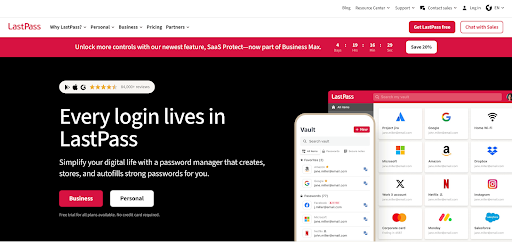
Now, we’re here to find out if LastPass is truly secure, where it works, what it offers besides password management, what the day-to-day experience is like, and if it’s worth paying for. So let’s get started.
Pros and Cons
Pros
- Works on all major platforms with smooth sync
- Free plan includes unlimited passwords
- Built-in authenticator and dark web monitoring
- Emergency access and one-to-many sharing on Premium
- Families plan is an excellent value for up to six users
- Strong encryption with 600k PBKDF2 iterations
Cons
- Long history of breaches undermines trust
- Free plan locked to one device type
- Closed-source, less transparent than rivals
- Offline access is view-only
- Customer support can be slow, especially on free
Is LastPass Safe?
Safe is a loaded word when it comes to LastPass. On paper, yes. The encryption checks out. Your master password is run through PBKDF2-SHA-256 600,000 times before it even reaches the vault, which makes brute-forcing painfully slow. And the vault itself is locked with AES-256.
But all the safety concerns derive from the data breaches it has gone through over the past few years. These breaches from 2022 and 2023 exposed weaknesses in LastPass’s encryption and infrastructure management. The attackers infiltrated their development environment, leveraged stolen data to access cloud backups of customer vaults, and compromised a DevOps engineer’s home computer. In the process, they also captured master passwords and gained access to sensitive corporate vaults. While they could not go past the encryption, the breaches raise serious concerns.
So the uncomfortable truth is that LastPass is only as safe as the master password and 2FA you set. If your master password is compromised, and such a data breach takes place again, your vault could be cracked offline.
LastPass emphasizes that its zero-knowledge model keeps your data protected. But those incidents do not inspire a lot of confidence.
Which Devices and Platforms Does LastPass Work On?
LastPass works everywhere you need it to work.
On desktop, it works through extensions for Chrome, Firefox, Safari, Edge, and Opera. There’s a web vault and native apps for Windows and macOS. While there’s no app for Linux, you can rely on the web vault and the browser extensions.
On mobile, LastPass has full-featured apps for iOS and Android. They integrate with the system’s autofill so your logins show up on apps and browsers with Face ID or a fingerprint tap. And yes, you can use biometric unlock so that you don’t have to type in your “hopefully long and complicated” master password.
Everything syncs through the cloud, so saving a password on your phone pushes it to your laptop instantly. But they have added an unnecessary complication for free users. You’ll only get one device type. That means it’s either all computers or all mobiles. If you want to bridge between your phone and desktop, you need Premium.
There’s also offline access. But it’s read-only. Once a vault is synced, you can still view passwords without internet, but you can’t add or edit until you’re back online.
What Else Does LastPass Offer Besides Password Management?
LastPass aims to provide you with digital vault services that go beyond just password management. And there’s quite a bit you can do with it.
Secure Notes & Payment Info
LastPass lets you store Wi-Fi passwords, software license keys, bank account details, recovery keys, and payment cards in the same encrypted vault. So, if you’ve been using Google Keep for all that, maybe now is the time to consider a change.
Password Sharing
Sharing credentials is sometimes necessary, and LastPass handles it securely. Free users can share a login or note with one other person, while Premium and Families unlock one-to-many sharing.
Built-in Authenticator
LastPass has its own authenticator app for generating time-based 2FA codes like Google Authenticator. It’s free for all users, but premium users can use it on their Wear OS or watchOS smartwatches. Hardware key support also comes with premium.
Emergency Access
You can designate trusted contacts who can request access to your vault in an emergency. You decide the waiting period (e.g., 7 days), and if you don’t decline the request in time, they’ll be granted access.
Secure File Storage
LastPass can also store sensitive files. It’s mainly meant for documents like scans of your passport, medical records, or tax documents. Free accounts get 50MB, and Premium accounts get up to 1GB.
Security Dashboard
You can have your vault audited in LastPass. This gives you a score on your dashboard based on password strength and reuse. It flags weak or old passwords and even checks if your credentials appear in known breaches on the dark web. Premium users get proactive alerts, which can be a nice early warning.
Passkey Support
LastPass is starting to roll out support for passkeys. It’s the new passwordless login standard endorsed by Apple, Google, and Microsoft. You can store and use them through LastPass and log into sites with biometrics instead of typing credentials. It’s still early days, but it still futureproofs the service.
Enterprise Benefits
For businesses, LastPass can be more than just a vault. Admins can enforce policies, manage groups, integrate with single sign-on with hundreds of apps, and sync with directories like Active Directory or Okta. Detailed event logs and audit reports for IT teams without exposing passwords.
Using LastPass Day to Day
Security is important for password managers. But what makes most users stick is convenience. It has to make your everyday logins painless. LastPass aims to do that.
Setup & Ease of Use
Getting started on LastPass is easy.
- You create an account
- Set a strong master password
- Install the browser extension or mobile app.
From there, LastPass starts capturing new logins as you browse. It also supports imports from browsers or other password managers, but the process is a bit clunky compared to competitors. Still, for most people, the onboarding is clear enough, with prompts to save your first login and test autofill.
User Interface & Design
The vault’s UI is functional and intuitive.
- On desktop, you get a list of entries organized by type (logins, notes, payment cards, etc.).
- The browser extension puts your passwords a click away with a dropdown search bar and quick copy options.
- On mobile, the app integrates with iOS and Android autofill, and biometrics make unlocking smooth.
- The overall design is consistent across devices. It’s quite minimal and clean.
Performance & Reliability
Day to day, LastPass is reliable enough to be out of sight unless needed.
- Logins save instantly and sync across devices in seconds for Premium users.
- Autofill works on most websites and apps, although it sometimes stumbles on very easy-to-recognize fields.
- Offline access is read-only, so you can still grab credentials even without an internet connection.
- In recent years, some users have reported bugs after updates, like the extension not recognizing certain login fields, but these tend to get patched quickly.
All in all, LastPass makes everyday password management easy. It’s not the best experience in each category, but it gets the job done.
How Much Does LastPass Cost? – LastPass Pricing & Plans
LastPass keeps its pricing fairly straightforward. But the efforts to upsell is very apparent here.
Free Plan
The free tier offers unlimited password storage and autofill, but only for one device type. That means all computers or all mobiles, not both together. It also includes one-to-one sharing and the Security Dashboard. If you live on either a phone or a laptop, this is doable, but most people will hit the limit quickly. This is an unnecessary limitation and clearly an upsell tactic.
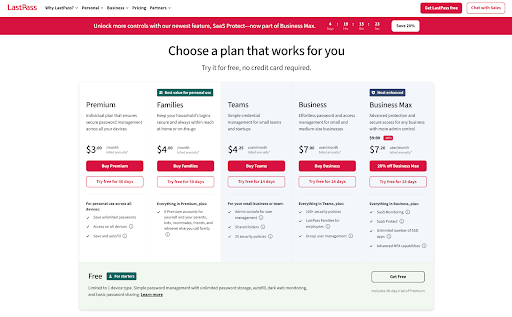
Premium ($3/month, billed annually)
Premium unlocks syncing across all your devices. It also adds advanced MFA options like YubiKey, one-to-many sharing, emergency access, and 1GB of encrypted file storage. You also get priority support and dark web monitoring alerts. At $36 a year, it’s competitive with most password managers.
Families ($4/month, billed annually)
For just a buck more, you can cover up to six people. Each person gets their own Premium account, plus a shared dashboard to manage household logins. One of the best family plans out there for under $50 a year per person.
Teams ($4.25 per user/month, billed annually)
This is for small businesses. It includes group sharing, admin controls, policy enforcement, and basic reporting. You also get limited single sign-on (SSO) integrations, which can simplify access for a small team.
Business (Enterprise) ($7 per user/month, billed annually)
For larger organisations, the Business tier unlocks unlimited SSO apps, advanced admin policies, directory integration, detailed reporting, and audit logs. It’s for IT departments that need centralised control and compliance features.
Business Plus (~$9 per user/month)
At the top end, LastPass now offers additional monitoring and integrations, such as SIEM support and shadow IT detection. Only relevant for enterprises with complex security operations.
Is LastPass Premium Worth It?
If you only use one device, you can stick with the free plan. But for most people, Premium is worth the cost.
The biggest upgrade is unlimited syncing across all your devices. That feature alone removes the most annoying limitations of the free plan and makes LastPass feel seamless. Additionally, Premium unlocks advanced MFA options like YubiKey, one-to-many sharing, emergency access, 1GB of encrypted file storage, and dark web monitoring alerts. These aren’t gimmicks—these features can make your vault more practical and secure for daily use.
At $3 a month (billed annually), Premium is fairly priced: not as cheap as Bitwarden’s $10/year plan, but less costly than Dashlane or 1Password. The Families plan, at $4/month for six users, is an even better deal if you’re managing multiple people.
So, yes, if you use LastPass across devices or value the extras, Premium is worth it. The free plan functions more like a demo. Once you reach its limits, you probably won’t want to rely on it long-term. At the same time, Premium makes LastPass a true password manager.
LastPass vs 1Password vs Bitwarden
In this comparison between the three, LastPass offers convenience and a free plan, but 1Password is safer, and Bitwarden is cheaper, making both stronger choices in 2025.
| Feature | LastPass | 1Password | Bitwarden |
| Security | AES-256, but scarred by breaches | AES-256 + Secret Key, spotless record | AES-256, open-source transparency |
| Ease of Use | Simple, familiar, a bit clunky | Polished UI, smooth autofill | Functional but not as sleek |
| Cross-Platform | Wide support, Linux via web only | Wide support with a native Linux app | Full device/browser coverage |
| Starts at | $36/year | $35.88/year | $10/year |
| Free Plan | Yes (device-type restricted) | None (trial only) | Yes (strong free tier) |
| Trust Factor | Damaged reputation | High trust, no breaches | Strong transparency & audits |
Wrapping Up
LastPass fulfills its role as a password manager: it stores your logins, syncs them across devices, and saves you from memorizing numerous passwords. In terms of features, it nearly checks every box.
The concern that shadows it is trust. LastPass has the correct encryption approach on paper, but repeated breaches have left lasting scars. You can secure your account with a strong master password and 2FA, yet the company’s history makes some users uneasy, and understandably so.
It’s ideal for users seeking convenience and a broad range of features. It offers an all-in-one solution that works everywhere and fulfills both personal and family needs without costing a fortune.