
When it comes to serious security tools like password managers, utility and encryption often take priority over user experience. That’s what Proton Pass aims to change, and they have the credentials to prove it. This is the same Swiss team behind Proton Mail and Proton VPN. It is open source, independently audited, and aggressively zero-knowledge.
Proton Pass has turned out to be a great tool, with a lot going on in 2025. It offers an excellent free plan, email aliases, and much more. We’re here to break it down and see what really makes it work. We will also compare it with some other leading password managers so you can make an informed decision.
A Quick Overview
| Category | Details |
| Encryption | 256-bit AES-GCM for vault items; bcrypt for account password hashing;Argon2 for offline storage; hardened SRP protocol for authentication;full end-to-end zero-knowledge design |
| Open Source | Yes. Fully open source (GPLv3), code available on GitHub |
| 2FA Support | TOTP authenticator apps, FIDO2/U2F hardware keys, biometric unlock |
| Cross-Platform | Windows, macOS, Linux desktop apps; iOS and Android apps;browser extensions for Chrome, Firefox, Safari; secure web vault |
| Recovery Options | Recovery phrase/account recovery available; Emergency Access |
| Offline Access | Available with Premium |
| Free Plan | Available |
| Starts at | $4.99/month, 35.88/year |
Pros and Cons
Pros
- Strong encryption
- Fully open source and Cure53 audited, with a clean security record
- Generous free plan
- Seamless cross-platform coverage, including Linux and Safari
- Built-in extras like breach monitoring, email aliases
- Affordable premium tier and excellent value family plan
- Integrated into Proton’s ecosystem
Cons
- Offline mode and 2FA authenticator are locked behind Premium.
- No smartwatch app (Apple Watch/Wear OS)
- Interface is clean but less customizable than Bitwarden
Is Proton Pass Safe?
Yes, Proton Pass is safe to use. It uses multiple modern encryption standards to keep your vault and master password safe, even in offline mode.
Your vault is protected with AES-256 GCM encryption. This is the same encryption used by banks and governments. Proton goes further than most. They encrypt everything. The password fields, usernames, email addresses, notes, and URLs are encrypted too, so Proton can’t see which sites you’ve saved.
When you log in, Proton uses a hardened Secure Remote Password (SRP) protocol. Your master password is never sent to their servers, and attackers can’t brute-force it offline. They only get one guess at a time. On top of that, your master password is hardened with bcrypt and in offline mode Argon2, both designed to resist GPU-based cracking.
Like Proton Mail and Proton VPN, Proton Pass follows a strict zero-knowledge architecture. All encryption and decryption happen on your device, so Proton doesn’t hold the keys and has no backdoor into your vault. Even if someone compromised Proton’s servers, they would only find gibberish.
Transparency is a big part of Proton’s safety, too. Proton Pass is fully open source; the code is published under GPLv3. Anyone can audit it, and in 2023, Proton commissioned Cure53 to do a full security audit. They found no critical issues, and the moderate findings were fixed before launch. On top of that, Proton runs a bug bounty program, and the code is continuously audited.
And the track record matters. Proton has never had a vault breach. The company has been running privacy-focused services for over 10 years, based in Switzerland, with some of the strongest data protection laws in the world. That combination of modern cryptography, open audits, and a clean history puts Proton Pass in a high-trust category.
Which Devices and Platforms Does Proton Pass Work On?
Proton Pass has grown fast since launch and now works pretty much everywhere you’d expect in 2025. The coverage is broad, with native apps, browser extensions, and a secure web vault. Here’s the breakdown:
Desktop & Web
Proton Pass has native apps for Windows, macOS, and Linux. The apps are lightweight, consistent in design, and integrate with system biometrics like Windows Hello or Touch ID, so you don’t always have to type your master password.
If you’re on a computer where you can’t install additional software, there’s also a web app available at pass.proton.me. All encryption and decryption still happen locally in your browser, keeping things in line with the zero-knowledge promise.
Mobile
Full-featured apps are available for iOS and Android. They plug directly into each system’s autofill framework, so Proton Pass suggestions pop up in apps and browsers just like a built-in manager would. Unlocking is fast with Face ID or a fingerprint, and the apps support generating strong passwords, scanning QR codes for 2FA setup, and even scanning physical cards to add payment info.
For privacy-conscious Android users who don’t use Google Play services, Proton Pass is also available through F-Droid.
Browser Extensions
For quick autofill on desktop, Proton Pass has extensions for all major browsers: Chrome, Firefox, Edge, Brave, and Safari. The extension saves new logins as you sign up, generates strong passwords, and fills multi-field logins accurately.
Offline Access
Premium (Plus) users get full offline mode. An encrypted copy of your vault is stored locally with Argon2 protection so that you can unlock and view everything without the internet. Free users don’t officially have offline mode, but cached data may still be viewable until you log out.
What Else Does Proton Pass Offer Besides Password Management?
Proton Pass has the strongest encryption standards, and there are multiple layers one would have to go through before they can access your vault. They definitely went a bit overboard there. But it doesn’t just end with encryption. There’s a lot more that makes it stand out.
Secure Notes & Payment Cards
You can save private notes, recovery codes, and payment cards in the same encrypted vault. Autofill works with card details during checkout, just like Chrome or Safari’s built-in managers, but with Proton’s encryption on top.
Password Sharing
Premium users can share logins or notes with other Proton Pass users through end-to-end encrypted vaults. You can also share via secure, time-limited links. Family accounts have shared vaults with an admin dashboard to manage who has access.
Breach Alerts & Health Checks
Proton’s Pass Monitor scans breach databases and the dark web for your saved emails. If your credentials show up in a leak, you’ll get notified. It also flags weak, old, or reused passwords in your vault so you can fix them quickly.
Hide-My-Email Aliases
Integrated with Proton’s SimpleLogin service, Proton Pass lets you create disposable email aliases when signing up for new sites. Emails are still forwarded to your inbox, but you can deactivate an alias if it starts getting spam. Free users get 10 aliases; Premium removes the cap.
Built-in 2FA Authenticator
With Premium, Proton Pass can store TOTP secrets and generate 6-digit 2FA codes. These sync across devices and even autofill during logins, replacing separate apps like Google Authenticator.
Passkeys Support
Proton Pass, like every modern password manager, now supports passkeys. It’s the passwordless standard backed by Apple, Google, and Microsoft. You can save and sync them across devices, log in with a fingerprint or Face ID instead of a password.
File Attachments
Premium users can attach encrypted files to entries. This comes handy for storing copies of IDs, passport scans, or recovery codes in the same secure vault.
Proton Sentinel
As an extra layer, Plus users can enable Proton Sentinel, which uses AI and human review to block suspicious login attempts. It’s basically a fraud-detection system for your Proton account, which includes Proton Pass.
Family & Business Features
Family accounts have shared vaults for up to 6 people. Business accounts have an admin dashboard, group policies, SCIM provisioning, audit logs, and enterprise support. Each user still has their own private vault, as well as shared team vaults.
Using Proton Pass Day to Day
Most password managers have an industrial UI design, and they prioritize function over convenience. And because most users are just looking for a strong password manager, they get away with offering a challenging user experience. But Proton is different in that regard. It covers all the bases.
Setup & Ease of Use
- It’s easy to get started.
- You download the app or browser extension.
- Create or log into your Proton account
- Set a strong master password
- Choose a recovery option.
- If you’re switching from another manager, Proton also offers clear import guides
The onboarding flow also prompts you to enable autofill on mobile and biometrics on desktop, which makes daily use smoother.
User Interface & Design
Proton Pass is clean and minimal across all platforms.
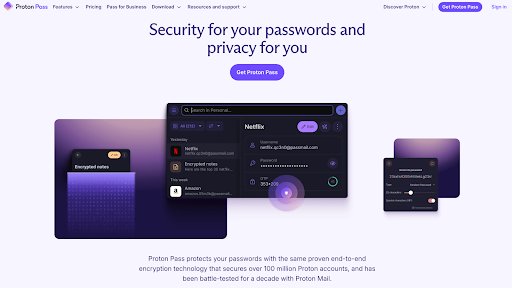
On desktop and web, the layout is simple. There’s a sidebar for vaults and categories, a list in the middle, and details on the right-hand pane. It’s easy to use without being flashy.
The mobile apps have a bottom navigation bar for passwords, categories, search, and tools, and Face ID or fingerprint unlock means you rarely have to type your master password.
The browser extension has the same simplicity as a pop-up that gives you search, suggested logins for the current site, and a built-in password generator.
Proton Pass isn’t as slick or animated as something like Dashlane or 1Password, but the design is polished enough to feel modern and consistent across platforms. It prioritizes clarity and speed over flash, and you don’t need to think about it.
Performance & Reliability
In daily use, Proton Pass feels fast and solid.
- Syncing is almost instant. Save a login on one device, and it shows up on the others in seconds.
- Autofill is accurate on most websites and mobile apps, even on multi-step login forms, and credit card autofill works without issues.
- Offline mode also works as advertised. You can open your vault, unlock it with biometrics, and access everything even without an internet connection.
- Stability has been good across platforms. The apps don’t lag, the extensions don’t crash, and when bugs do appear, Proton has a good track record of pushing out fixes quickly.
Proton Pass doesn’t slow down your system either. It’s lightweight enough to handle large vaults without slowdowns, and the whole experience feels solid from first login to daily autofill.
How Much Does Proton Pass Cost? – Proton Pass Pricing & Plans
Proton offers personal and business tiers for Proton Pass, all integrated into its overall ecosystem. The free plan is quite good, and the paid options are pretty affordable as well if you’re willing to commit to an annual plan.
Personal Plans
Free Plan
Free with unlimited passwords, notes, and devices. You also get a password generator, weak/reused password alerts, passkey support, easy imports, and up to 10 email aliases. What you don’t get are premium features like unlimited aliases, file attachments, or secure sharing.
Pass Plus ($2.99/month or $35.88/year)
This unlocks everything missing from Free, which comes with unlimited aliases, built-in 2FA authenticator, secure vault and link sharing, unlimited credit cards, dark web monitoring, file attachments, advanced account protection, and emergency access. Also includes quality-of-life features like custom domains for aliases, additional mailboxes, and the ability to send emails from an alias.
Pass Family ($4.99/month or $59.88/year)
Up to 6 users, each with a full Pass Plus account. Includes an admin panel to manage shared vaults and family invitations in one place. It’s one of the better family plans out there. And it’s less than $1 per user per month if you fill all six seats.
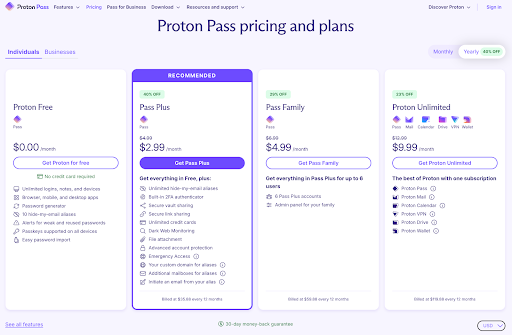
Bundled with Proton Unlimited ($12.99/month or $119.88/year)
Includes Proton Pass Plus and the full Proton suite. That means Proton Mail, Proton Calendar, Proton VPN, Proton Drive, and Proton Wallet. If you already pay for Proton Mail or VPN, Unlimited is often the best deal.
Business Plans
Pass Essentials ($4.99/user per month or $23.88/user per year)
Minimum three users. Includes unlimited logins, apps on all platforms, built-in 2FA, dark web monitoring, password health check, passkey support, and unlimited aliases.
Pass Professional ($6.99/user per month or $59.88/user per year)
Minimum three users. Adds SSO and SCIM, activity logs, enterprise policies, advanced account protection, file attachments, and SIEM integration.
Proton Business Suite ($14.99/user per month or $155.88/user per year)
This is the complete Proton package for businesses. You’ll get Pass Professional, Proton Mail, Calendar, Drive, VPN, and Wallet. Each user gets 1 TB of storage, 15 custom email domains, shared calendars, cloud file sharing, and VPN connections for up to 10 devices.
Is Proton Pass Premium Worth It?
If you only need a vault for yourself, Proton Pass Free works well. You get unlimited passwords, device sync, and 10 email aliases, so you don’t need to upgrade right away. For casual use on a phone and laptop, the free plan is sufficient. However, there are two main drawbacks to the free tier. It doesn’t come with an authenticator, which honestly, you can just use another authenticator app alongside it. But the biggest issue is the lack of proper offline access.
If either one of those is a huge no-no for you, you will want what the Pass Plus plan unlocks. Offline mode means you’re never locked out when traveling or disconnected. The breach alerts and password health dashboard help you fix weak or compromised logins before they become a real problem. Unlimited aliases through SimpleLogin give you disposable emails for every site, which is a rare privacy perk in the password manager space. And if you’ve ever been annoyed juggling a separate authenticator app, the built-in 2FA code generator is a convenience you’ll quickly come to rely on.
At $2.99/month (billed annually), Proton Pass Plus is cheaper than most of the competition and adds features they don’t have. Bitwarden Premium is more affordable at $10/year but lacks email aliases and proactive breach alerts. NordPass Premium is in the same price bracket, but the free tier is much more limited, and it doesn’t match Proton’s open-source transparency.
The Family plan at €4.99/month is a no-brainer if you’re securing more than one person. Six full Plus accounts and a shared admin panel make it one of the best family deals in the market. For businesses, the Essentials and Professional tiers scale affordably, and the Business Suite makes sense if you’re already invested in Proton’s broader privacy tools.
Proton Pass vs Bitwarden vs NordPass
| Feature | Proton Pass | Bitwarden | NordPass |
| Security | AES-256 GCM encryption, bcrypt + Argon2 hashing, SRP login protocol | AES-256 CBC encryption, PBKDF2-SHA256 with Argon2 | XChaCha20 encryption, Argon2id hashing |
| Ease of Use | Clean and minimal apps, seamless autofill across platforms | Functional but utilitarian UI, plenty of power-user options, slightly less polished | Slick & modern design, easy onboarding, polished apps |
| Cross-Platform | Windows, macOS, Linux, iOS & Android apps, browser extensions, web vault. | Windows, macOS, Linux, iOS & Android apps, browser extensions, web vault, CLI too, self-host options | Windows, macOS, Linux, iOS & Android apps, browser extensions, web vault. |
| Pricing | Starts at 2.99/month | Starts at $10/year | Starts at $2.99/month |
| Free Plan | Yes, and quite usable | Yes, the most generous free plan | Yes, but only one device login at a time |
| Trust Factor | Backed by Proton AG (Proton Mail, Proton VPN), Swiss jurisdiction, open source and audited, no breaches. | Open source since 2016, transparent audits, no breaches. | Backed by Nord Security (NordVPN), SOC2 certified, closed-source but audited, no breaches. |
Takeaways
- Proton Pass gives you Bitwarden’s transparency with a more beginner-friendly interface and extras like aliases, breach alerts, and offline mode.
- Bitwarden is still unbeatable if you want rock-bottom pricing and self-hosting flexibility.
- NordPass offers a slick experience and strong cryptography, but its free plan is limited, and its closed-source nature means trust hinges on audits.
Wrapping Up
Proton Pass may be new to the market, but it already feels mature. It combines the privacy-first philosophy Proton is known for with the usability people expect from a modern password manager. The free plan is generous enough to get people away from browsers’ built-in managers, and the Plus plan adds serious features like breach monitoring, unlimited aliases, offline mode, and vault sharing. All for less than most of its competitors.
On the trust side, Proton Pass delivers what many users have been asking for. It’s fully open-source code, has a clean independent audit, and there’s no breach history. Add in Swiss jurisdiction and Proton’s 10-year history in security services, and it’s on solid ground.
There are some gaps, but they are minor compared to the overall package. Proton Pass hits the sweet spot with a password manager that’s transparent, private, and easy to use without feeling bare bones.