
You’ve heard of Nord. If not for NordPass, definitely for NordVPN. They haven’t been in the password management scene for long. But they have a good track record of building online security-focused products to make this worth a look. And NordPass has a lot going on.
Quick Overview
| Category | Details |
| Encryption | XChaCha20 encryption with Argon2id key derivation;zero-knowledge, end-to-end encrypted vault |
| Open Source | No. Proprietary software, but independently auditedand SOC 2 Type II certified |
| 2FA Support | Authenticator apps (TOTP), FIDO2 hardware keys,Duo, plus biometric unlock on mobile |
| Cross-Platform | Windows, macOS, Linux, iOS, Android, and browser extensionsfor Chrome, Firefox, Edge, Safari, Opera, Brave; web vault access |
| Recovery Options | Recovery Code at setup; Emergency Access for trusted contacts |
| Offline Access | Yes. View items offline once synced |
| Free Plan | Available. unlimited items, but only one active device at a time |
| Starts at | Starts at ~$1.99/month (billed annually) |
At first glance, it features modern cryptography, sane pricing, and a quick setup process followed by a clean UI. Now, they also have a good marketing team that creates many flashy campaigns. But we’re here to look through that to the features that you might actually care about.
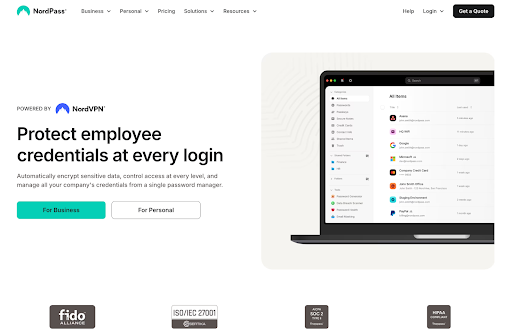
So let’s break down stuff like security measures, the day-to-day autofill experience, the extras that you might actually want to use, and pricing.
Pros and Cons
Pros
- Strong encryption
- No breaches to date
- Affordable Premium plans
- Cross-platform apps and unlimited device sync
- 3 GB secure file storage
- Passkey support and passwordless login options
- Emergency Access for trusted contacts
- 24/7 customer support (even for free users)
Cons
- Free plan limited to one active device at a time
- Closed-source
- Some advanced features (e.g. Emergency Access setup) are tied to mobile
- No dedicated Apple Watch or Wear OS app
- Vault organisation is basic, no options for deep tagging or custom fields
Is NordPass Safe?
Yes. NordPass is one of the most secure password managers in 2025.
At its core, NordPass uses XChaCha20 with Argon2id. Which is differen’t from almost any other password manager if you have read any of our reviews. They usually all use AES-256 encryption. However, both of them are uncrackable so you should be good.
- AES-256 is the classic industry standard, hardware-accelerated on modern CPUs, and used by banks and governments. It’s a block cipher that’s been stress-tested for decades which makes is very realiable.
- XChaCha20 is a more modern stream cipher designed for speed and security across all platforms. It specializes in running on low-power devices and browsers without hardware acceleration. And it avoids common pitfalls like nonce reuse. So hackers can’t spot patterns in your data.
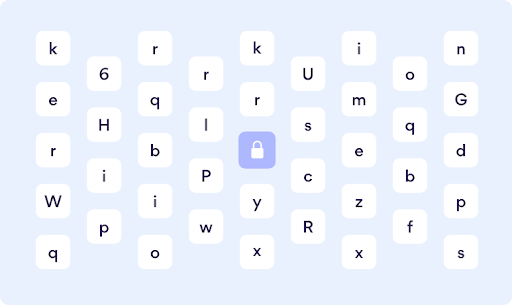
In practice, you’re not trading security by going with XChaCha20. What you are trading is some of AES’s heavyweight history for a cipher that’s easier to implement correctly and consistently fast on every device. But don’t worry about that, NordPass handles it well.
On top of that, NordPass strengthens your master password with Argon2id, a memory-hard hashing algorithm that’s way more resistant to brute-force attacks than the older PBKDF2 method many competition uses. This makes offline cracking attempts slow, even if someone had access to your encrypted vault.
Other security checks:
- Zero-knowledge design: Your vault is encrypted and decrypted only on your device. NordPass never sees your master password or plaintext data.
- 2FA support: You can lock your account behind authenticator apps, hardware keys, or biometrics.
- Audits and certifications: NordPass has been audited (Cure53) and has a SOC 2 Type II certification, which means both the codebase and operational security practices have been validated.
- Clean track record: Unlike some competing password manager, NordPass has had no security breaches to date.
So is NordPass safe? Absolutely. Its use of XChaCha20 and Argon2id shows a preference for modern cryptography that avoids common implementation traps. The clean track record also makes it a safe choice, even though it’s mostly because NordPass is new. However, they have enough measures implemented to make sure that even when someone does get access to the vault data, they cannot actually access it. It’s one of the best password managers in 2025 that you can trust.
Which Devices and Platforms Does NordPass Work On?
Whether you’re on Windows, macOS, Linux, iOS, Android or just a browser, there’s a way to get to your NordPass vault.
Desktop & Web
NordPass has apps for Windows, macOS and Linux, all with the same design. If you can’t install software, there’s also a web vault you can access from any modern browser. It’s zero-knowledge just like the apps, so your data is still encrypted before it leaves your machine.
Mobile (iOS & Android)
On phones and tablets NordPass integrates with the system’s autofill services. That means usernames and passwords pop up in apps and browsers just like the built-in managers. You can unlock with Face ID, Touch ID or a fingerprint, so you don’t have to type your master password on a small screen. The apps also let you scan credit cards to save details instantly.
Browser Extensions
There are NordPass extensions for Chrome, Firefox, Edge, Opera, Brave and Safari. These handle password capture, autofill and quick search without leaving the page. Autofill is fast and reliable and the extension keeps your logins synced with the desktop or mobile apps.
Wearables
There’s no watchOS or Wear OS app yet, so you can’t pull up passwords on your wrist. It’s a small gap compared to 1Password or Dashlane, but not a deal-breaker for most people.
Offline Access
Once your vault has synced you can view items offline on any device. That means even without the internet (say, on a flight) you can still get to your logins. You can’t add or edit until you’re back online, but at least you’re never locked out.
What Else Does NordPass Offer Besides Password Management?
Over the last few years, NordPass has added a bunch of extras that make it feel like a full security suite. Here’s what you get beyond the basics:
Secure Notes & Payment Info
You can store Wi-Fi passwords, recovery codes, license keys, and personal notes in encrypted form. NordPass also has a dedicated section for credit cards, with card-scanning on mobile so you don’t have to type numbers manually.
Password Sharing
Paying users can share logins, notes or cards with other NordPass users. It’s end-to-end encrypted so only the intended recipient can read it. If you share often, you can add “trusted contacts” for faster approval.
Emergency Access
You can set up trusted contacts who can request access to your vault if something happens to you. You control the waiting period (e.g. 7 days), and if you don’t deny the request in time they’ll get access. A simple but essential digital inheritance feature.
Data Breach Scanner
NordPass Premium includes a scanner that checks your emails and other details against breach databases. If your info is found in a leak, you’ll get an alert so you can change that password before it’s exploited.
Password Health Checker
The app analyzes your vault and flags weak, reused or old passwords. It even gives you shortcuts to update them. It’s like a quick health check-up for your entire digital identity.
Email Masking (Aliases)
In partnership with SimpleLogin, NordPass Premium lets you generate disposable email aliases. Use them for sign-ups to keep your real address hidden. If an alias starts getting spammed just disable it. Premium plans include up to 200 of these.
File Storage (Secure Documents)
You can attach documents to your vault items or store them standalone. Premium accounts come with up to 3 GB of encrypted file storage. It’s handy for passport scans, insurance papers or backup codes you don’t want sitting in Google Drive.
Built-in Generators
NordPass includes both a password generator and a username generator. These generators can help you create long random passwords and usernames, and if they’re hard to remember… well, you’ve got a password manager.
Passkey Support
NordPass was one of the first to support passkeys. You can create, save and sync passkeys across devices and log in with biometrics instead of a typed password. It’s a future-proof move as more services go passwordless.
Business Features
For teams, NordPass scales with admin console, shared company vaults, activity logs and policies like 2FA mandatory. It integrates with single sign-on providers like Azure AD and Okta. Certifications like SOC 2 and ISO 27001 make it compliant for businesses.
Using NordPass Day to Day
If a password manager slows you down or makes logins more complicated, you’ll stop using it. So, NordPass manages to stay out of the way while giving you enough prompts to keep you in flow.
Setup & Ease of Use
Getting started with NordPass is just as easy as their other products:
- Create a Nord Account if you don’t have it already.
- Set a strong Master Password for your vault.
- Save the Recovery Code they provide during setup.
- Download the app or browser extension.
- And you’re ready to import or add logins.
Imports from browsers and other managers are simple, and NordPass walks you through the onboarding with clear prompts. The two-password system (Nord Account + Master Password) can seem weird at first, but once set up, you mostly just use biometrics or your Master Password day to day.
User Interface & Design
NordPass is clean and minimal.
- On the desktop, a sidebar sorts everything into categories: Passwords, Notes, Credit Cards, Files, and Tools.
- The Tools tab includes the password generator, email masking, password health check, and breach scanner.
- On mobile, it’s the same structure, with a bottom menu for easy navigation.
- Browser extensions open a lightweight pop-up with search and autofill options.
It’s not super fancy or anything, but it’s consistent across platforms. Even non-techy users won’t get lost.
Performance & Reliability
Day to day, NordPass is solid and fast.
- Autofill: Works in most apps and websites, with few hiccups. Login prompts appear instantly when you need them.
- Sync: Changes made on one device show up on others almost immediately.
- Offline access: You can view stored passwords without internet.
- Stability: Apps don’t crash, extensions update without breaking features, and biometrics unlock is fast.
The only minor annoyance is that some advanced features (like setting up Emergency Access) are mobile only. But overall, NordPass gives you a smooth daily driver experience.
How Much Does NordPass Cost? – NordPass Pricing & Plans
NordPass is a freemium model. The free plan is more like a teaser. And the paid plans that unlock the full experience in a fairly affordable price. Discounts are frequent, especially on multi-year subscriptions, but here’s the baseline pricing as of 2025:
Free Plan
The free tier gives you unlimited passwords, notes, and credit cards, but there’s a catch: you can only be logged in on one device at a time. That means if you log in on your laptop, you’ll be logged out on your phone. It’s fine for single-device users or for testing, but it gets restrictive if you hop between devices daily. Free also removes features like password sharing, health reports, breach scanning, and emergency access.
Free Trial & Refund Policy
New users get a 30-day Premium trial when signing up, no credit card required. After that, you can stay on Free or upgrade. All paid plans come with a 30-day money-back guarantee, so you can cancel risk-free.
Personal Plans
Premium (Personal) ($23.88/year)
For individual users, NordPass Premium unlocks the full toolkit:
- Unlimited devices (up to 6 active at once)
- Password sharing
- Emergency access
- Data Breach Scanner
- Password Health checker
- Email masking aliases
- 3 GB of encrypted file storage
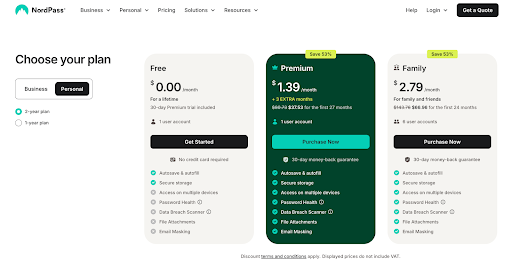
Pricing is $1.99/month billed annually ($23.88/year). Two-year plans drop the price to around $1.39/month and gives you 3 extra months for free. For less than the cost of a coffee per month, you can remove all the free plan’s limitations.
Family ($44.28/year)
The Family plan has six Premium accounts under one subscription. Each person gets their own vault, with the ability to share items securely between members.
- Up to 6 users
- Each account includes all Premium features
- Managed under one bill
It’s $3.69/month billed annually ($44.28/year). That’s around 61 cents per user per month if you fill all six slots. This is one of the best family values in the market. And it costs less than many individual plans from competing password managers like 1Password.
Business Plans
Teams ($1.79 per user/month; billed annually)
NordPass offers a Teams pack for small groups. You get more stuff alongside all the premium features from the personal plans.
- Fixed 10-user pack
- Company-wide settings
- Google Workspace SSO
At $1.79 per user/month, it’s a budget-friendly option if you just want the essentials without dashboards or advanced SSO.
Business ($3.59 per user/month; billed annually)
For small to mid-sized companies, the Business plan adds advanced management features:
- Company-wide settings
- Google Workspace SSO
- Security Dashboard
- Shared Folders
It’s $3.59 per user/month (billed annually), and requires a minimum of 5 users. There’s a free trial so you can test before committing.
Enterprise ($5.39 per user/month; billed annually)
For larger organisations that need deeper integrations and provisioning:
- Everything in Business
- SSO with Entra ID, MS ADFS, and Okta
- User and group provisioning via Entra ID and Okta
- Sharing Hub for streamlined collaboration
You pay $5.39 per user/month (billed annually), starting from 5 users. Also includes a free trial.
Is NordPass Premium Worth It?
The free version of NordPass is good to get a taste, but in practice, it feels more like a demo. The one-device limit will get to you fast if you use both a phone and a laptop. And without breach monitoring, password health checks or sharing, you’re not really getting the full protection.
Premium fixes all of that. For $1.99/month on the annual plan, you get:
- Seamless multi-device sync (up to 6 active at once)
- Data Breach Scanner and password health reports
- Secure item sharing with family or coworkers
- Emergency Access for trusted contacts
- Up to 3 GB of encrypted file storage
- Email masking to hide your real address on sign-ups
That’s a lot of security and convenience for less than the price of a cup of coffee a month. The Family plan, at about $44/year for 6 people, is even better value, essentially pennies per user for full-featured accounts.
Compared to the competition, NordPass is in a sweet spot. It’s cheaper than Dashlane and even undercuts 1Password’s individual plan, while offering extras like email aliases and more file storage. Bitwarden still wins on price with its $10 Premium, but NordPass feels more polished and user-friendly.
NordPass vs LastPass vs 1Password
When stacked against two of the biggest names, NordPass shows why newer doesn’t mean weaker. Here’s how it lines up next to LastPass and 1Password in 2025:
| Feature | NordPass | 1Password | LastPass |
| Security | XChaCha20 + Argon2id, zero-knowledge | AES-256 + unique Secret Key, zero-knowledge | AES-256 + PBKDF2; zero-knowledge in design |
| Ease of Use | Clean, beginner-friendly apps; simple onboarding; modern UI. | Polished and powerful; excellent design but a bit more complex for newcomers. | Functional, but clunkier UX; recovery process and import/export feel dated. |
| Cross- Platform | Windows, macOS, Linux, iOS, Android, all major browsers, web vault. | Windows, macOS, Linux, iOS, Android, browser extensions, Apple Watch. | Windows, macOS, iOS, Android, browser extensions |
| Pricing | $1.99/month (annual) Premium; $3.69/month Family (6 users). | $2.99/month Personal; $4.99/month Family (5 users). | $3/month Individual; $4/month Family (6 users). |
| Free Plan | Yes, but restricted to one active device at a time. | None (14-day trial only). | Yes, but limited to one device type (mobile or desktop). |
| Trust Factor | Backed by Nord Security; no breaches to date; audited. | SOC 2 certified; no breaches. | History of multiple vault breaches (2015, 2022). Seen as less reliable. |
Takeaway
- NordPass: Modern cryptography, smooth apps, and great value. A solid middle ground between affordability and polish.
- 1Password: The most premium feel with advanced features like Travel Mode and Watch support, but at a higher cost.
- LastPass: Still has features and familiarity, but its breach history continues to dent confidence. A deal-breaker for many in 2025.
Wrapping Up
NordPass may not have the history of 1Password or the market share of LastPass, but in 202,5 it’s proven itself to be one of the most reliable password managers you can choose. Modern cryptography (XChaCha20 + Argon2id), strong audits, and no breach record gives it credibility and the apps are light, simple and cross-platform.
The free plan works if you’re on one device, but the real value is in Premium and Family. Both are cheaper than most competitors without cutting features. Extras like email masking, a large file locker and passkey support shows NordPass isn’t just keeping up but innovating where others are slow to adapt.
If you want modern security, ease of use, and affordability, NordPass is a strong recommendation. It’s one of the smartest password managers you can subscribe to in 2025.