
RoboForm might just be the most boring password manager you’ll ever use. And that’s a compliment. In security, boring is beautiful. It means no headlines about scandalous data breaches, no bad rep to rebuild, and no fluff and bloat. What you get instead is a password manager that has been around for more than two decades and has kept doing its thing.
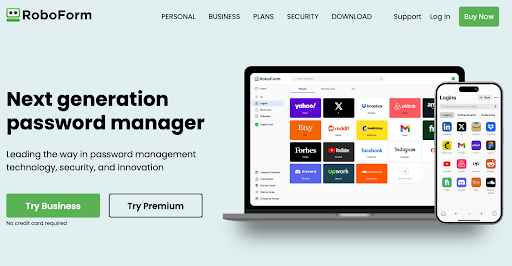
Its design is minimal, intuitive, and even a little old-school compared to newer competition. Still, it’s reliable where it matters: storing, filling, and protecting your passwords with zero-knowledge encryption. It has a spotless security record, newly audited code, and one of the most affordable premium plans in the industry. And while others are just now catching up to passkeys and flexible 2FA, RoboForm already has them baked in.
A Quick Overview
| Category | Details |
| Encryption | AES-256, PBKDF2-SHA256 (8M+ iterations) |
| Open Source | No (closed-source, audited 2023 & 2025) |
| 2FA Support | TOTP apps, SMS/email, biometrics, hardware keys, passkeys |
| Cross-Platform | Windows, macOS, iOS, Android, browser extensions, watchOS |
| Recovery Options | Emergency Access, biometric restore (mobile), no backdoor reset |
| Offline Access | Yes (local encrypted copy, optional Local-Only mode) |
| Free Plan | Yes (unlimited passwords, one device only) |
| Price | Starts at $29.88/year. |
In this review, we’re going to dive deep into what makes RoboForm’s simplicity its strength. We’ll cover its safety model, cross-platform reach, extra features beyond password storage, and how it stacks up against the likes of Keeper and Dashlane. By the end, you’ll see why a “boring” password manager might be exactly what you need.
Pros and Cons
Pros
- One of the cheapest paid plans
- Strong encryption with 8M+ PBKDF2 iterations
- Excellent autofill, especially on complex forms
- Works across all major platforms + Apple Watch
- Passkey support and built-in TOTP authenticator
Cons
- Free plan limited to a single device
- Closed-source, relies on audits for transparency
- Family plan capped at five users
Is RoboForm Password Manager Safe?
Yes, RoboForm is safe.
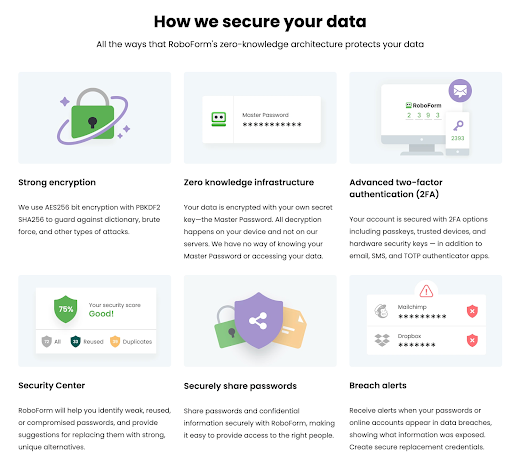
Your vault is encrypted with AES-256, the same standard used by banks and governments. When you create your Master Password, RoboForm runs it through PBKDF2-SHA256 with over 8 million iterations. This slows down brute-force attacks to the point where guessing your password is nearly impossible. Even if someone stole your encrypted vault, all they would see is useless cryptic data.
RoboForm follows a zero-knowledge model. All encryption and decryption happen on your device, and your Master Password never leaves your computer or phone. Siber Systems (the company behind RoboForm) cannot reset your Master Password or access your data, so there’s no company backdoor. The trade-off is that if you forget your Master Password, RoboForm cannot assist you in recovering it. Instead, you get Emergency Access, where a trusted contact can unlock your vault after a delay, or biometric restore on mobile if you set it up.
Along with vault encryption, RoboForm offers many two-factor authentication options. You can use authenticator apps (TOTP), SMS or email codes, biometrics, or hardware keys like YubiKey. In 2025, RoboForm will support passkeys for account login. So even if your Master Password is compromised, an attacker would still need your second factor to access your account.
Security isn’t just for theatricals here. RoboForm has a clean record. In over 20 years, it has never experienced a major breach of customer data. That’s rare in this industry, especially compared to larger names like LastPass. To verify this, RoboForm was audited in 2023 and 2025. The auditors examined our desktop apps, mobile apps, browser extensions, and server infrastructure. They confirmed our zero-knowledge architecture and encryption model. RoboForm also holds SOC 2 certification for our cloud service, demonstrating strong internal controls.
Of course, no password manager is perfect. RoboForm is closed-source, so unlike Bitwarden or Proton Pass, the code isn’t open for public inspection. Instead, you must rely on the audit reports and their long history. For some, that’s a dealbreaker; for others, 20+ years without an incident is more valuable than open-source code.
Finally, RoboForm features a Security Center that monitors your stored passwords. It flags weak or reused logins and compares your credentials against known data breaches. Premium users can add up to 5 email addresses for continuous breach monitoring, ensuring you’ll be notified if your accounts ever appear in a leak.
Which Devices and Platforms Does RoboForm Work On?
RoboForm works on pretty much everything you’d wanna run it in 2025. Desktop, mobile, or browser, wherever you need it, your vault is available and synced.
Desktop & Web
RoboForm offers full-featured apps for Windows and macOS, including a vault editor, folder organization, and advanced options like application logins outside the browser. Linux and ChromeOS users don’t have a native app, but RoboForm runs smoothly through its browser extensions and secure web app. If you’re away from your devices, you can log into the RoboForm Online portal (start.roboform.com) to access your vault from any browser.
Mobile
On mobile, RoboForm has iOS and Android apps that integrate with the operating system’s autofill frameworks. This means logins appear across apps and browsers just like a built-in manager. Face ID, Touch ID, or Android biometrics make unlocking instant, so you don’t have to type your Master Password every time. RoboForm also supports password capture on mobile, allowing new accounts created on your phone to save seamlessly to your vault.
Browser Extensions
RoboForm has extensions for all major browsers: Chrome, Firefox, Edge, Safari, Opera, Brave, and others. The extension manages autofill, new login capture, password generation, and quick entry search. It can even run in standalone mode on Chrome if you prefer not to use the full desktop app, which is especially useful on Linux or shared computers. Autofill performance remains consistent, and RoboForm excels at handling complex multi-step forms that other managers struggle with.
Wearables
RoboForm extends functionality to the Apple Watch. You can quickly view selected logins or one-time passcodes without needing to reach for your phone. While it’s not a full vault on your wrist, it’s a practical addition for OTP codes or quick lookups. macOS users can also unlock the desktop app using their Apple Watch, providing extra convenience for Apple fans.
Offline Access & Sync
Once synced, RoboForm stores a local encrypted copy of your vault on every device. This allows you to log into accounts offline, whether on a plane or in an area without service. Changes made are queued and automatically sync the next time you connect. For privacy-conscious users, RoboForm offers a Local-Only mode, where your data never touches the cloud. It lets you manage backups and transfers manually.
What Else Does RoboForm Offer Besides Password Management?
Like most managers, RoboForm handles the basics well. But where it stands out is in the extras that make daily security easier and your vault more useful. Here’s what you get beyond password storage:
Form Filling & Identities
RoboForm built its name on form-filling, and it’s still one of the best at it. You can create detailed Identities with addresses, contact info, and payment cards, then fill entire checkout or sign-up forms with one click. It even supports multiple profiles (personal, work, family) so you can switch between them as needed.
Safenotes
Not every piece of sensitive data is a username and password. RoboForm lets you save things like Wi-Fi passwords, license keys, or recovery codes as encrypted Safenotes. These sync and search just like logins, so you don’t have to stash them in plain-text notes elsewhere.
Password Sharing
RoboForm allows secure sharing of logins or folders with other RoboForm users. You choose whether recipients can only use the login, or view and edit it as well. Family accounts can set up shared folders, making it easy to keep streaming services, Wi-Fi, or household logins accessible to everyone.
Emergency Access
You can designate trusted contacts who can request access to your vault if something happens to you. You set the waiting period, and if you don’t decline in time, they’re granted access. Free users can only receive access, while Premium lets you both grant and receive.
Security Center & Breach Monitoring
The built-in Security Center audits your vault for weak, reused, or old passwords and shows you a score. Premium adds breach monitoring for up to 5 email addresses, so you’ll get alerts if your accounts show up in a data leak.
Built-in Authenticator
RoboForm can generate TOTP 2FA codes right inside the app. Scan a QR code once, and RoboForm will produce the 6-digit login codes for that site. It keeps those codes synced across devices, so you don’t need Google Authenticator or Authy separately.Passkey Support
RoboForm now supports passkeys, the new passwordless login standard. It can create, store, and autofill passkeys across devices, turning biometric logins into a seamless alternative to passwords. You can even share passkeys securely with other RoboForm users.
Business Features
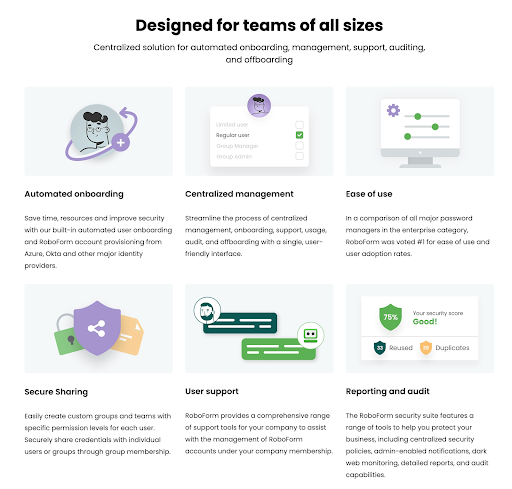
RoboForm for Business adds an admin console, directory integration, role-based permissions and security reporting. Admins can enforce 2FA, set password policies and monitor team-wide password health without seeing the actual passwords. Business plans also include free Family accounts for employees.
Using RoboForm Day to Day
Using RoboForm is super straight forward. It’s not flashy with a lot of bloat. And that’s what we like about it. It’s minimal enough to easily fade into the background, and reliable enough to show up when summoned.
Setup & Ease of Use
Getting started is easy. On desktop you download the installer, create your account, set a Master Password and RoboForm will prompt you to add the browser extensions. Importing existing passwords is smooth. It can pull from Chrome, Firefox, Edge or export files from other managers. On mobile setup is even faster: log in, enable autofill in system settings and you’re done.
User Interface & Design
The interface is where RoboForm feels a bit old school. The desktop app uses a folder-and-list layout that looks more like a file explorer than a modern dashboard. It’s not bad. In fact some users would like the easy and intuitive organisation system. But it doesn’t feel as clean or modern as 1Password’s sidebar or Dashlane’s web app. The mobile apps are much more polished, with a clean list view and easy access to search, generator and vault items. The browser extension is functional: a quick dropdown for search and autofill, though if you have a large vault it can feel cramped. Overall the design is practical but not pretty.
Performance & Reliability
This is where RoboForm makes up for its dated look. Autofill is fast and accurate, especially with tricky multi-step forms. A legacy of its form-filling heritage. Passwords save instantly and sync across devices in seconds. Offline access also works reliably: once synced your logins are available even without internet and changes queue until you reconnect. The apps are lightweight and stable, no lag or crashes during testing. In daily use RoboForm doesn’t get in your way.
The net effect is that RoboForm becomes part of your routine without demanding attention. You log in, it fills. You sign up, it saves. You need to change a weak password the Security Center will nudge you. It’s not the most stylish experience but it’s one of the smoothest if function is your priority over form.
How Much Does RoboForm Cost? – RoboForm Pricing & Plans
RoboForm keeps it simple and affordable compared to most others. Not too many tiers, simple annual pricing, and good discounts.
Free Plan
RoboForm Free lets you store unlimited passwords but it’s limited to one device. You get autofill, password generation, the Security Center and 2FA for your account. You don’t get syncing across devices or cloud backup.
Discounts & Guarantee
RoboForm has sales for new users (30–50% off the first year) and educational and military discounts. All personal plans have a 30-day money-back guarantee and business plans have a 14-day free trial for up to 30 users.
Premium – $29.88/year
Premium unlocks everything: unlimited devices, cloud sync and backup, web vault access, secure sharing, emergency access, breach monitoring for up to 5 emails and the built-in authenticator for TOTP codes. Even at the new price it’s cheaper than most. Dashlane, 1Password, and Keeper have much higher pricing.
Family Plan – $47.75/year
The Family subscription covers up to 5 users. Each person gets their own Premium account with unlimited devices and full features plus the ability to share logins or folders with other family members. Under $10 per person per year it’s one of the more affordable family options though capped at 5 users.
Business Plans – Starting at $39.95/year per user
RoboForm for Business includes everything in Premium plus centralized administration, policy enforcement, audit logs and directory integration. Each business user also gets a free Family plan for personal use which is a nice bonus. Compared to 1Password or Dashlane’s $5–$8/user/month business tiers RoboForm is a more cost effective option for smaller teams.
Is RoboForm Worth It?
Yes! RoboForm is absolutely worth it if you’re looking for a secure, affordable, and no-nonsense password manager.
For individual users, RoboForm Premium at $29.88/year is one of the cheapest of the known password managers. You get unlimited devices, strong encryption, 2FA, emergency access, passkey support, and breach monitoring for less than the price of a single streaming subscription. If you’re comparing strictly on features vs cost, RoboForm is a better value than Keeper or Dashlane. The only free plan drawback is the one-device limit. So you’ll almost certainly need Premium.
For families, the $47.75/year Family Plan is a good deal. It covers up to 5 people with full Premium features, which is less than $10 per person per year. It doesn’t scale as high as Dashlane Friends & Family (10 users), but for a household of 4-5, RoboForm is a great value.
For businesses, RoboForm is $39.95 per user per year, which is way cheaper than the competition. Dashlane’s business plans start at around $60/user/year, and 1Password Business at around $100/user/year. RoboForm gives you the basics: admin controls, directory integration, policy enforcement, and audit logs. It may not have the advanced phishing detection or SIEM integrations that Dashlane has, but for small to mid-sized teams, RoboForm is one of the most cost-effective enterprise-ready managers.
RoboForm delivers solid security, great autofill, and one of the lowest prices in the industry. If you value substance over style, RoboForm is an easy recommendation for individuals, families, and cost-conscious businesses.
RoboForm vs Keeper vs Dashlane
| Feature | RoboForm | Keeper | Dashlane |
| Security | AES-256, PBKDF2-SHA256 (8M+ iterations) | AES-256, PBKDF2-SHA256 | AES-256, Argon2 |
| Ease of Use | Functional UI, strong autofill | Modern apps, smooth sync | Clean web-first apps, fluid autofill |
| Cross-Platform | Windows, macOS, iOS, Android, browser extensions, Linux (web), Apple Watch | Windows, macOS, Linux, iOS, Android, browser extensions, Apple Watch | Windows, macOS, Linux (web/extension), iOS, Android, browser extensions, watchOS, Wear OS |
| Pricing | Starts at $29.88/year | Starts at $39.99/year | Starts at $59.88/year |
| Free Plan | Yes (1 device only) | Yes, but with very limited features | No, trial only |
| Trust Factor | 20+ years, no breaches, audited | Strong record, SOC 2 certified | No breaches, independent audits |
Takeaways
- RoboForm is far cheaper than Keeper or Dashlane while still giving you unlimited devices, passkey support, and strong encryption.
- RoboForm remains one of the most reliable form-fillers on the market, handling complex logins and long forms better than most rivals.
- It lacks the polished design of Keeper or the bundled extras like Dashlane’s VPN, but its spotless record and affordability make it the practical pick.
Wrapping Up
RoboForm proves that “boring” can be the best compliment a password manager gets. It hasn’t made headlines for the wrong reasons, it doesn’t overwhelm you with features you’ll never use, and it doesn’t cost a fortune. Instead, it sticks to the essentials: strong encryption, smooth autofill, reliable sync, and pricing that undercuts almost everyone else.
The interface feels plain next to 1Password or Dashlane, and the free plan is decent but not usable long-term. But if what you want is a safe, affordable, and consistent way to keep your accounts secure, RoboForm delivers precisely that. Sometimes, boring is the smartest choice you can make.